<?xml version="1.0" encoding="utf-8"?>
<feed xmlns="http://www.w3.org/2005/Atom">
    <id>https://paulmcbride.com/</id>
    <title>PaulMcBride.com</title>
    <updated>2026-07-07T11:58:47.233Z</updated>
    <generator>https://github.com/jpmonette/feed</generator>
    <author>
        <name>Paul McBride</name>
        <email>hello@paulmcbride.com</email>
        <uri>https://paulmcbride.com</uri>
    </author>
    <link rel="alternate" href="https://paulmcbride.com/"/>
    <link rel="self" href="https://paulmcbride.com/atom"/>
    <subtitle>The tech ramblings of Paul McBride</subtitle>
    <logo>https://paulmcbride.com/static/banner.jpeg</logo>
    <icon>https://paulmcbride.com/static/favicons/favicon.ico</icon>
    <rights>All rights reserved 2026, Paul McBride</rights>
    <contributor>
        <name>Paul McBride</name>
        <email>hello@paulmcbride.com</email>
        <uri>https://paulmcbride.com</uri>
    </contributor>
    <entry>
        <title type="html"><![CDATA[What is the Fediverse?]]></title>
        <id>/posts/what-is-the-fediverse</id>
        <link href="https://paulmcbride.com/posts/what-is-the-fediverse"/>
        <updated>2024-10-11T00:00:00.000Z</updated>
        <summary type="html"><![CDATA[Today, social media websites are owned and operated by a handful of billionaires vying for your attention so they can advertise to you. The Fediverse is the antithesis of these legacy social media sites and might be our only shot at a better future for the social web. In this post, I'll dive into what the Fediverse is and what I think it means for the future of the social web.]]></summary>
        <content type="html"><![CDATA[<p>Today, social media websites are owned and operated by a handful of billionaires vying for your attention so they can advertise to you. The Fediverse is the antithesis of these legacy social media sites and might be our only shot at a better future for the social web. In this post, I'll dive into what the Fediverse is and what I think it means for the future of the social web.</p>
<h2>What is the Fediverse?</h2>
<p>Defining the Fediverse is, honestly, a little tricky. My understanding is that it is a series of interconnected apps, servers, and websites. There are lots of services for interacting with the Fediverse, including Mastodon, WordPress, Peertube, Pixelfed and even Threads. (This is definitely not an exhaustive list, so if I've left out an important one, let me know.)</p>
<p>When you have an account with one of the services listed above and share some content, other people on any of the other services can potentially see and interact with your posts, photos, etc. I personally mostly use Mastodon. You can check out my profile <a href="https://indieweb.socail/@ThePaulMcbride" target="_blank" rel="noopener noreferrer">here</a>.</p>
<h2>How does it work?</h2>
<p>The Fediverse is powered by an open protocol called <a href="https://www.w3.org/TR/activitypub/" target="_blank" rel="noopener noreferrer">ActivityPub</a>. I'll not dig into exactly what that means, but behind the scenes, this is the specification that defines how one server communicates with another. The Fediverse doesn't run on any singular server, it is decentralized. Depending on the service, this means that if you don't like the server that your account is hosted on, you can move.</p>
<p>That might sound complicated, but it is a concept you are probably already familiar with. This is exactly how email works. You might have your email hosted with Gmail, but you can still email people who host their email with Outlook. If you don't like Gmail, you could move somewhere else. The Fediverse works the same way.</p>
<h2>Why does it matter?</h2>
<p>I think the Fediverse is one of the most important movements on the web in the last 10 or more years. Right now, most social media is a walled garden stuffed full of ads. If you post something on Twitter, your friends on Facebook won't see it. Worse than that, Twitter and Facebook are gathering huge amounts of data about you that they can then sell to advertisers. That might not matter to you, but I'd rather have the apps and services I use operated for my benefit.</p>
<p>As I mentioned, the Fediverse isn't one thing. You can find a service or server that works best for you and that matches your values. Most services are free to use and are operated by volunteers. I make a monthly donation to the server that hosts my account, but you don't need to do that.</p>
<p>On the Fediverse, I am in control of my data. My timeline isn't powered by an algorithm, and I only see content from people I follow. It's honestly kind of boring, which is exactly what I want. I spent 20 minutes or so per day catching up, then I put it down and don't think about it again.</p>
<h2>How to get started</h2>
<p>There are so many ways to create an account on the Fediverse. It can be a little overwhelming. My recommendation is to head to <a href="https://mastodon.social/" target="_blank" rel="noopener noreferrer">https://mastodon.social/</a> and sign up there. Spend a few days (or as long as you want) exploring, and then move to another server if you want.</p>
<p>Also, reach out to me if you want help or have questions. I'm not an expert in this stuff, but it is by far the most pleasant relationship I have ever had with social media, and I'd love to see you all there.</p><div style="margin-top: 50px; font-style: italic;"><strong><a href="https://paulmcbride.com/posts/what-is-the-fediverse">Read on the website</a>.</strong></div>]]></content>
        <author>
            <name>Paul McBride</name>
            <email>hello@paulmcbride.com</email>
            <uri>https://paulmcbride.com</uri>
        </author>
    </entry>
    <entry>
        <title type="html"><![CDATA[Kagi Search - A Long-term Review]]></title>
        <id>/posts/kagi-search</id>
        <link href="https://paulmcbride.com/posts/kagi-search"/>
        <updated>2024-03-25T00:00:00.000Z</updated>
        <summary type="html"><![CDATA[Search is often the doorway to the web. Kagi Search is a new, privacy focused search engine that I've been using for the past year. Here's my review.]]></summary>
        <content type="html"><![CDATA[<p>You've probably heard the saying that if you don't pay for a product, you are the product. With Google search, this has never been more true. These days, it is not unusual that the first page of results contains more ads than useful results. I don't blame Google for this, running a search engine costs money. It does put them in the position that what is good for them is not good for their users.</p>
<p>The more ads Google shows you, the more money they make. The longer you spend crawling through results unable to find what you are looking for, the more money they make. The ideal outcome for you and Google are different things. This doesn't even get into the privacy implications (of which there are many).</p>
<h2>Kagi Search</h2>
<p>For the last year, I have been a paying user of Kagi Search. It is a premium (as in paid-for) search engine that provides all the same functions as Google. You can search for whatever you like, get directions, read restaurant reviews etc.</p>
<p>You might be wondering why I would pay for a search engine if there are a bunch of other free ones. It all comes down to aligned incentives. Kagi makes money by charging end users for access to their service. If they want those users to keep paying for the service, they have to provide the best experience they can.</p>
<p>When I search for something on Kagi I'm not bombarded with ads. It is in Kagi's best interest to get me useful results as quickly as possible and stay out of my way. I don't have to scroll past a bunch of links that someone has paid for me to see. A side effect of this is that Kagi doesn't need to collect a bunch of personal data about me to make sure the ads are targeted.</p>
<p>If you are the kind of person who cares about your privacy and would rather spend your money than your attention, then check out Kagi. If the privacy issues don't bother you then there still might be a case for you to use Kagi.</p>
<h2>Personalised Results</h2>
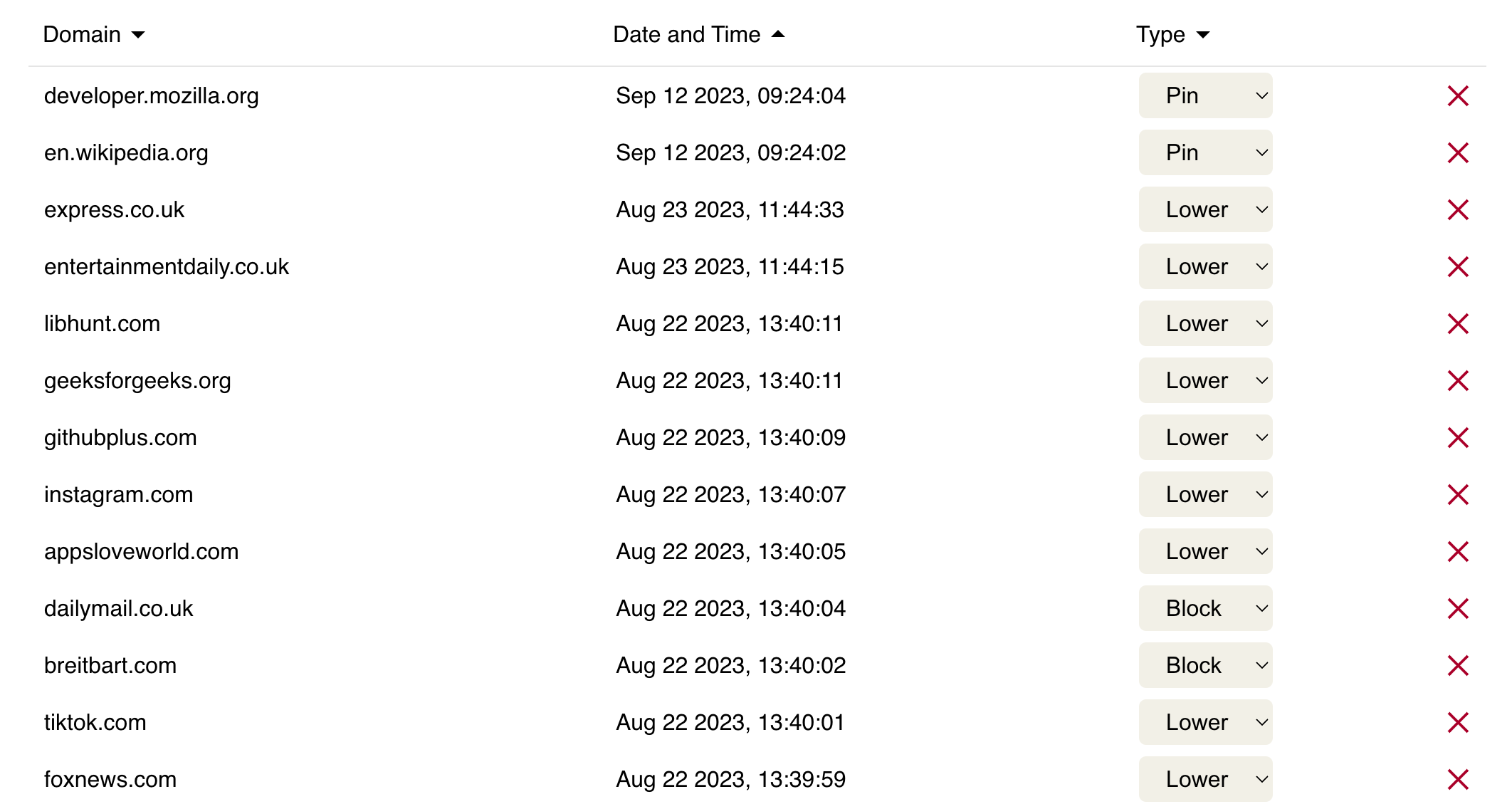
<p>One of my favourite features of Kagi is the ability to tailor the kinds of results it shows me. If there is a particular domain that, if relevant, I always want to see in the results, I can pin it. Similarly, I block a domain if I never want to see it. I can also boost, and lower domains based on my preferences. Here is a screenshot of what my settings currently are.</p>
<p><img src="https://data.paulmcbride.com/images/kagi-personalisation.png" alt="A screenshot of the Kagi personalisation page where you can see some of the sites that I&#x27;ve pinned or blocked" class="rounded-lg"></p>
<p>There are a bunch more, but you get the idea.</p>
<h2>Lenses</h2>
<p>Another cool feature is Lenses. A lens is a filter you can view your search results. There are a bunch built in, like "Small Web" if you only want to see results from non-commercial websites, "Programming" if you only want to see links to official language websites and so on.</p>
<p>You can also create custom lenses. This is done by including and excluding certain keywords, boosting or lowering domains and various other parameters.</p>
<p>There are of course a load more features, but the Kagi website will do a better job of explaining them than I will.</p>
<h2>What I don't like</h2>
<p>While I love Kagi, it isn't perfect. Firstly, right now it seems to be focused on technical users like developers. This makes a lot of sense for them as tech-savvy folks are more likely to care about online privacy and to seek out an alternative.</p>
<p>Secondly, as Kagi is fairly niche, it is not an option to make it the default search engine in most browsers. This is easily resolved by installing an extension, but that experience on iOS is not great. As a result, your searches get sent to your default search engine before you get redirected to Kagi. I know there is nothing Kagi can do about this, but I wish there was a better way.</p>
<p>Finally, the shopping options on Kagi aren't great. I used to frequently put a product name into Google and see a list of places I could buy it, either online or locally. This isn't great on Kagi honestly. More often than not, I get results for the US Amazon instead of the UK one, and I rarely see any local results.</p>
<h2>Conclusion</h2>
<p>Paying for something you can get for free is not for everyone, but for me, Kagi is worth it. Search is often my doorway into the wider internet, and I'd far rather that experience was working for me rather than trying to sell my attention to the highest bidder.</p><div style="margin-top: 50px; font-style: italic;"><strong><a href="https://paulmcbride.com/posts/kagi-search">Read on the website</a>.</strong></div>]]></content>
        <author>
            <name>Paul McBride</name>
            <email>hello@paulmcbride.com</email>
            <uri>https://paulmcbride.com</uri>
        </author>
    </entry>
    <entry>
        <title type="html"><![CDATA[Sunsetting WeCode NI]]></title>
        <id>/posts/sunsetting-wecode-ni</id>
        <link href="https://paulmcbride.com/posts/sunsetting-wecode-ni"/>
        <updated>2024-02-11T00:00:00.000Z</updated>
        <summary type="html"><![CDATA[After 5 years of running WeCode NI, I have decided to shut it down.]]></summary>
        <content type="html"><![CDATA[<p>This week, I decided to shut down WeCode NI. For those unaware, WeCode NI was a job board for developers in Northern Ireland. I created it almost 5 years ago following a frustrating job search. Most job adverts were managed by recruitment agencies, so it was difficult to know who you're applying for before sharing your details. To this day I still get calls from those agencies! WeCode NI was my attempt at making things better. It was a job board that only allowed the direct employers to post adverts and including the salary was mandatory.</p>
<h2>Why I've shut it down</h2>
<p>There are a number of factors that led to me deciding it was time to call it quits. The main one was that it was no longer as popular or profitable as it once was. It wasn't serving me or the community I built it for. There are a couple of reasons I think this happened.</p>
<p>Firstly, Twitter was purchased my a maniac and for whatever reason, they made API access extremely expensive. As a result, WeCode NI job postings were no longer shared automatically on Twitter.</p>
<p>In addition to Twitter, the other main source of both applicants and employers I had was a Slack channel for NI tech workers. A few years ago, the admins asked me to stop sharing links to new job posts. They did this out of fairness to other job boards, I think, as WeCode NI was technically a private company. I understand the decision, but ultimately it cut down on the number of eyeballs on the site.</p>
<p>Finally, there has been a general down turn in the number of tech jobs in Northern Ireland. I can't say for certain why this is, but I suspect it has to do with Brexit, Covid and the general lack of political stability here.</p>
<p>WeCode NI had been slowly declining for the past few years and I no longer felt comfortable accepting payments for job adverts, so I decided it was time.</p>
<h2>Success</h2>
<p>It's not all doom and gloom, though. WeCode NI was a success by any measure. In the ~5 years or so that it's been online it has brought in around £15k and the running costs were less than £500. That isn't a huge amount of money for 5 years, but it's not nothing. In that same, time I had a little under 500 jobs posted and dozens of people have reached out to tell me that they found their job on WeCode NI.</p>
<p>Aside from business success, it was also a great platform for me to experiment with and learn new technologies. Over the years, the tools used to build the site changed a few times. The first version was built with a Firebase backend. Eventually I got spooked by Google killing product after product and so moved to a more self-hosted platform and database. In all, I've used three different databases, multiple front end frameworks, and I used TypeScript for the first time on the project. Even if the WeCode NI had made no money, I'd have considered it a success.</p>
<h2>What would I have done differently?</h2>
<p>There are plenty of things that I did correctly, but if I could start again, I would find a partner to work with. Ideally I'd work with someone with more marketing skills than I have. I never minded reaching out to folks and pitching WeCode NI, but it's not where I'm most useful.</p>
<p>fFrom a tech point of view, the other thing I would focus on more if I got to start over is integrations. For smaller companies this wasn't an issue, but for larger companies, they usually had more than one recruiter and used some form of applicant tracking system. I think if I'd made it easier for larger companies to post to WeCode NI through tools they were already using, I'd have got more of their business.</p>
<h2>What's next?</h2>
<p>I'm currently in the process of moving the US to spend more time with my wife's family. Over the next few months I'll be using the time and energy I spent on WeCode NI with my family and friends instead. I'm also starting to do more contracting work, which will help ensure I have some income continuity during the move. I have no plans for a new side project just yet.</p>
<h2>Conclusion</h2>
<p>I worked on WeCode NI in my spare time. After the initial build, I spend less than a few hours each month doing updates and upgrades. I'm really happy with how it all worked out.</p>
<p>I've enjoyed building and sharing WeCode NI with my corner of the internet. Thank you to everyone who posted or applied for a job on the site. I would love to see someone build a successor, either with the code I shared or something completely original.</p>
<p>The code from the original site can be found on <a href="https://github.com/thepaulmcbride/wecode-ni" target="_blank" rel="noopener noreferrer">GitHub</a>. I also have a full dump of the database available that I could share if anyone has any fun ideas for it. I'll have to scrub the user data first, of course.</p><div style="margin-top: 50px; font-style: italic;"><strong><a href="https://paulmcbride.com/posts/sunsetting-wecode-ni">Read on the website</a>.</strong></div>]]></content>
        <author>
            <name>Paul McBride</name>
            <email>hello@paulmcbride.com</email>
            <uri>https://paulmcbride.com</uri>
        </author>
    </entry>
    <entry>
        <title type="html"><![CDATA[Make it work, Make it right, Make it fast]]></title>
        <id>/posts/make-it-work-make-it-right-make-it-fast</id>
        <link href="https://paulmcbride.com/posts/make-it-work-make-it-right-make-it-fast"/>
        <updated>2024-01-26T00:00:00.000Z</updated>
        <summary type="html"><![CDATA[Don't fall into the trap of premature optimisation. Before you spend time and money building the perfect app or feature, build a cheap prototype to make sure it is possible and people actually want it.]]></summary>
        <content type="html"><![CDATA[<p>Writing software is hard. One of the main reasons for this is that there are so many ways to achieve the same thing. Each implementation of a feature has tradeoffs. It is easy to fall into the trap of premature optimisation and waste a lot of time trying to build the perfect solution to a problem that might not exist.</p>
<p>When starting a software project I recommend the following approach - <strong>Make it work, make it right, then make it fast</strong>.</p>
<h2>Make it work</h2>
<p>The first step in any software project is coming up with a solution to a problem. It doesn't need to be perfect, it just needs to solve the problem. For example, if you have to build an admin panel for a website, don't worry about making sure the solution is pixel-perfect. It doesn't matter if it isn't responsive. It only matters that the end user can achieve what they need to. They'll likely have to jump through some hoops and it might only work under certain conditions, but that is fine.</p>
<p>At this stage, you might want to ship what you have. It depends on the culture of your company and the kind of project you are building. Personally, I tend to air on the side of caution here, but getting some user feedback at this stage can be very useful.</p>
<p>During this first phase, you'll learn more about the problem. You'll figure out what the difficult parts are and what doesn't work. If you have the time, I would actually recommend deleting all of the code you just wrote before moving into the next step, but I'll cover that in another article.</p>
<h2>Make it right</h2>
<p>You now know the problem can be solved and you even have a basic solution. Now is when we take that solution and make it more robust. Again we'll use the example of an admin dashboard. This is when you go back and make sure what you built actually matches the design, or, chat with the designer and find a better solution now that you know what is possible and what is not.</p>
<p>This is also when you can handle all of the edge cases. You probably didn't test on all of the major browsers. Or it might be relying on data that some old accounts on the system don't have. Fix these issues and sure your tests are as comprehensive as they need to be.</p>
<p>For many software projects, especially in the startup phase, this is where you stop. You have a solution to the problem that works and is robust. There are a million other features in the backlog, so ship it and move on. If however, you are at the stage where you expect this feature to get very heavy usage or you're building an e-commerce platform and every millisecond counts, then it's time to make it fast.</p>
<h2>Make it fast</h2>
<p>You've solved the problem and everything is working, but time is money. It is time to go the extra mile and optimise what you've built. If you're running your code and any kind of scale, then spending some time making sure you have taken advantage of caching etc can reduce the load on your servers and save you money. Faster e-commerce websites also tend to convert better than a slower equivalent.</p>
<p>A word of warning when it comes to optimisation. We waited until the end to optimise for a reason. Usually, when you spend time optimising some piece of software you make it harder to work with and harder to change. Premature optimisation can still be a problem at this stage. I recommend getting the feature in the hands of users before worrying too much about how fast it is. No one cares how fast your app doesn't do what they want.</p>
<h2>Conclusion</h2>
<p>Before you spend time and money building the perfect app or feature, build a cheap prototype to make sure it is possible and people actually want it. As developers, we love to come up with clever, optimised solutions. That is great, but do the dumb easy version first.</p><div style="margin-top: 50px; font-style: italic;"><strong><a href="https://paulmcbride.com/posts/make-it-work-make-it-right-make-it-fast">Read on the website</a>.</strong></div>]]></content>
        <author>
            <name>Paul McBride</name>
            <email>hello@paulmcbride.com</email>
            <uri>https://paulmcbride.com</uri>
        </author>
    </entry>
    <entry>
        <title type="html"><![CDATA[Inaction is a Slow Death]]></title>
        <id>/posts/inaction-is-a-slow-death</id>
        <link href="https://paulmcbride.com/posts/inaction-is-a-slow-death"/>
        <updated>2024-01-15T00:00:00.000Z</updated>
        <summary type="html"><![CDATA[Embrace the discomfort of doing the right thing. It's better than the discomfort of a mediocre life.]]></summary>
        <content type="html"><![CDATA[<p>Doing the right thing is hard. It's often easier to do nothing at all. We make these kinds of decisions dozens of times per day. It is constant and it is exhausting. It can feel safer not to make decisions at all and to just let life happen. I'm going to try and convince you why that is a bad idea.</p>
<p>Heads up, this post is going to focus on how stoicism can make your life better. If that isn't your jam, feel free to check out now.</p>
<p>You might be familiar with the song Life is a Rollercoaster by Irish musician Ronan Keating. It's a banger, filled with terrible advice. In it, he says "Life is a rollercoaster, just gotta ride it." Unless you want to be a passenger in your own life, I suggest you ignore him.</p>
<p>Before we go any further, let's acknowledge a few universal truths. Firstly, life is hard. It's supposed to be that way. We're upright hairless apes, clinging on to a spinning rock that is hurtling through space. That is never going to be easy. Secondly, no matter what, there is going to be some amount of discomfort and pain in life. That goes hand in hand with life being hard.</p>
<p>Now, let's get back to decisions. We know that life is hard and that discomfort and pain are inevitable, so let's use that to our advantage. Most decisions in life have a pretty obvious "right" choice. Should you start going to the gym or should you stay at home and watch Netflix? Should you start that project you have been meaning to do or do you instead put on another Youtube video?</p>
<p>Generally speaking, you know what the "right" decision is. It's going to the gym and starting that project. But if you don't think too hard about it, it is also a difficult choice. Going to the gym will be uncomfortable. Starting the project? Hard work ahead! Yet, if you dig a bit deeper. Not hitting the gym is discomfort too, it just looms later in life. It's that unsettling feeling when you look back and ask yourself if you've truly achieved your aspirations. If pain is inevitable either way, why not opt for the discomfort that has a purpose?</p>
<p>If you take one thing away from this post, let it be this:</p>
<p>Pain and discomfort are part of life. Choose the pain that moves your life in the direction you want, don't trick yourself into accepting the pain of a mediocre life.</p>
<p>This article is heavily inspired by the <a href="https://www.youtube.com/watch?v=RIVVQkZtnAU" target="_blank" rel="noopener noreferrer">YouTube video</a> of the same name. I've thought about it regularly since I first watched it and wanted to interpret and share what I learned from it in my own words.</p><div style="margin-top: 50px; font-style: italic;"><strong><a href="https://paulmcbride.com/posts/inaction-is-a-slow-death">Read on the website</a>.</strong></div>]]></content>
        <author>
            <name>Paul McBride</name>
            <email>hello@paulmcbride.com</email>
            <uri>https://paulmcbride.com</uri>
        </author>
    </entry>
    <entry>
        <title type="html"><![CDATA[Writing is Thinking]]></title>
        <id>/posts/writing-is-thinking</id>
        <link href="https://paulmcbride.com/posts/writing-is-thinking"/>
        <updated>2024-01-02T00:00:00.000Z</updated>
        <summary type="html"><![CDATA[Writing is a great way to organize your thoughts and ideas. It's a tool for leveling up your thinking and communication skills.]]></summary>
        <content type="html"><![CDATA[<p>The most energy-hungry part of the human body is the brain. Our large brains are what set us apart from other animals and have made us one of the dominant species on this planet. To me, it makes sense then that when we do that hard work of thinking we should try to get the best return on the energy we spend. The best way to do that is to write.</p>
<p>When I write, I challenge my understanding of my ideas. I am forced to distil them into clear sentences rather than loose thoughts and feelings. I can ask questions about my writing and when I don't get answers I instead get topics for further research. With my thoughts on paper (or a screen), I find it much easier to have discussions with myself about those ideas. It feels very similar to the idea of <a href="https://paulmcbride.com/posts/rubber-duck-debugging">rubber duck debugging</a>.</p>
<h2>How I take notes</h2>
<p>After reading <a href="https://paulmcbride.com/posts/building-a-second-brain">Building a Second Brain</a> by Tiago Forte I've started to organise my notes by actionability. I use what he calls the PARA method. I'll not be covering what that is in this article, but the most important part is that I have a list of projects/problems that I am actively working on. When I'm consuming content (articles, videos etc) I'm mindful of this list and if the content might be relevant to any of my projects. If it is, I'll make a new note linking to the content and I'll write a few words on my interpretation of it and why it is relevant to my work.</p>
<p>Later, when I'm working on a project, I have a bunch of notes linking to relevant content along with what I was thinking when I first watched/read it. From there I'll refine my notes, add to them, or delete them if I no longer think they are relevant.</p>
<p>I use Obsidian for writing and note-taking, but it doesn't matter what app you use. What matters is getting your ideas out of your head and challenging them. Find out what you're missing or if you have any contradictory thoughts or ideas.</p>
<p>If you'd like to see how effective writing is for leveling up your thinking then try the following:</p>
<p>Using whatever note-taking app you like, create a new note and write down a list of what you believe are your core values. Pick any one of those values and explore it. Write about why you hold that belief and what experiences led you to it. Do you have any other beliefs that are counter to it? When was the last time you modified your behaviour because of that belief and was it worth it? Next, try this again, but instead of writing about it, do it in your head. With the written example I'm certain you'll have gone deeper and have a better understanding of that part of your identity.</p>
<h2>Conclusion</h2>
<p>Writing is a tool for thinking. It forces you to slow down and make sense of your thoughts. It can be used for introspection and for exploring the world around you. Next time you come across something that piques your curiosity, try writing about it.</p><div style="margin-top: 50px; font-style: italic;"><strong><a href="https://paulmcbride.com/posts/writing-is-thinking">Read on the website</a>.</strong></div>]]></content>
        <author>
            <name>Paul McBride</name>
            <email>hello@paulmcbride.com</email>
            <uri>https://paulmcbride.com</uri>
        </author>
    </entry>
    <entry>
        <title type="html"><![CDATA[Use the Debugger]]></title>
        <id>/posts/use-the-debugger</id>
        <link href="https://paulmcbride.com/posts/use-the-debugger"/>
        <updated>2023-11-09T00:00:00.000Z</updated>
        <summary type="html"><![CDATA[I recently started using the chrome debugger and I wish I'd started sooner. Learn what I was missing out on and how to get started.]]></summary>
        <content type="html"><![CDATA[<p>Recently I was working on a bug in my day job where a 3rd party dependency was misbehaving. Usually when something like this happens in code I have control over, I'd sprinkle in a few <code>console.logs</code> to find out what was going on. Most of the time this would help me close in on the problem. With this issue being inside a node module, it made things a little trickier.</p>
<p>In a scenario like this you have a few options, you could dig into the node modules folder, find the (often minified) code and use <code>console.log</code> as you usually would. Or, you could use the built in JavaScript debugger.</p>
<p>Caveat: All of what I'll be talking about in this article is specific to JavaScript and TypeScript that runs in the browser. Backend frameworks almost always support this too but you'll need to look up the docs specific to whatever you are using.</p>
<h2>How I usually debug</h2>
<p>As mentioned above, until recently, my debugging strategy revolved around <code>console.log</code>. When a bug was reported, I'd figure out how to reproduce it, track down where the bug happens in the code and put console logs everywhere. Usually I'd log a label of some kind, for example the function name I was logging in and a list of any variables that were related to the issue. This is what I call cave man debugging. It is pretty rudimentary, but in my 10 years of working as a developer, it has yet to fail me.</p>
<p>With that said, there is a better approach. One I wish I'd embraced years ago.</p>
<h2>What is the debugger?</h2>
<p>The debugger is a tool that allows you to pause the executions of your code at runtime and inspect the values of any variables in that scope along with the call stack. It also allows you to step through the code line by line as the program runs and see those variables change over time. You could achieve a lot of this with a bunch of console logs too, but I've fund the debugger to be a lot less hassle.</p>
<p>To get started, fire up which ever project you're working on and head to the browser. In this article I'll be using a Chrome based browser but this'll work in any browser. Next open up your project in your editor and insert the <code>debugger</code> keyword where you want the app to pause for inspection. Remember, this will only work for code running in the browser by default. You'll have a few more steps for server code. Finally, head back to the browser and interact with your app in a way that will get the piece of code with the <code>debugger</code> statement in it to run.</p>
<p>You should see your app paused and the browser dev tools opening in the sources tab. This tab will have a bunch of information about the call stack, the values of relevant variables and controls to resume the execution of your code. You can skip the debugger and you code will carry on or you can step through the execution line by line and in and out of functions.</p>
<h2>Conclusion</h2>
<p>I'm not going to tell you how to use the debugger. It'll depend on your project and the browser you are using. However, I am going to tell you that you should be using the debugger. It is way easier to use than you might think. It involves no setup for code running in the browser and it'll make you look clever to your colleagues.</p><div style="margin-top: 50px; font-style: italic;"><strong><a href="https://paulmcbride.com/posts/use-the-debugger">Read on the website</a>.</strong></div>]]></content>
        <author>
            <name>Paul McBride</name>
            <email>hello@paulmcbride.com</email>
            <uri>https://paulmcbride.com</uri>
        </author>
    </entry>
    <entry>
        <title type="html"><![CDATA[I Learned How to Type]]></title>
        <id>/posts/i-learned-how-to-type</id>
        <link href="https://paulmcbride.com/posts/i-learned-how-to-type"/>
        <updated>2023-05-10T00:00:00.000Z</updated>
        <summary type="html"><![CDATA[I spent the last week learning how to properly type, this is how it went.]]></summary>
        <content type="html"><![CDATA[<p>Hi, I'm Paul. I'm 31 years old and this week I learned how to type.</p>
<p>I've been using computers almost daily since I was 7 years old. Back then it was for playing games and chatting with my friends. These days it's for work (and still playing games). There is rarely a week goes by where I don't spent at least 40 hours a week in front of a keyboard. With those numbers you'd expect I'd know how to use one properly, but I don't. I've been a four finger typer for the last 20 odd years, but this week that changed.</p>
<h2>Why I Learned to Type</h2>
<p>There are a couple of reasons why I decided to learn how to type properly. Firstly, with how I make my living, it's border line embarrassing that I can't type properly. I'm a pretty good developer and I've often joked that my ideal editor would be one that I could control with my mind. They don't exist yet, so I'm stuck with a keyboard and while thats the case, I'd rather my fingers were able to keep up with my brain.</p>
<p>Secondly, with how much time I spend at a keyboard, it's only a matter of time before I develop RSI or something similar. I already get mild pain in my wrists after a long day of typing, so I'd rather nip that in the bud before it becomes a real problem.</p>
<h2>How I Learned to Type</h2>
<p>The first step to getting better at typing is actully learning where all the keys are and what fingers I should be using to press them. I found a great website called <a href="https://www.keybr.com/" target="_blank" rel="noopener noreferrer">keybr</a> that teaches you how to type. It starts off with the home row keys and then slowly introduces more keys as you get better. It shows you a keyboard on the screen so you can see where the key you're looking for is without actually looking down at the keyboard. This was a fairly brutal process. I went from typing at 60 words per minute to 10 words per minute. It was a real struggle to not look down at the keyboard and I found myself getting frustrated at how slow I was typing. This was especially true when working.</p>
<p>After 3 days of spending an hour or more in the evening on keybr, I'd finally "unlocked" all of the keys. I was still only typing around 25 wpm, but it was getting better. Next I moved over to <a href="https://monkeytype.com" target="_blank" rel="noopener noreferrer">monkeytype</a>. It is a similar website to keybr, but it focuses on whole words rather than groups of letters. It has lots of different modes, from 30 second sprints to modes where you pick the number of words you want to type.</p>
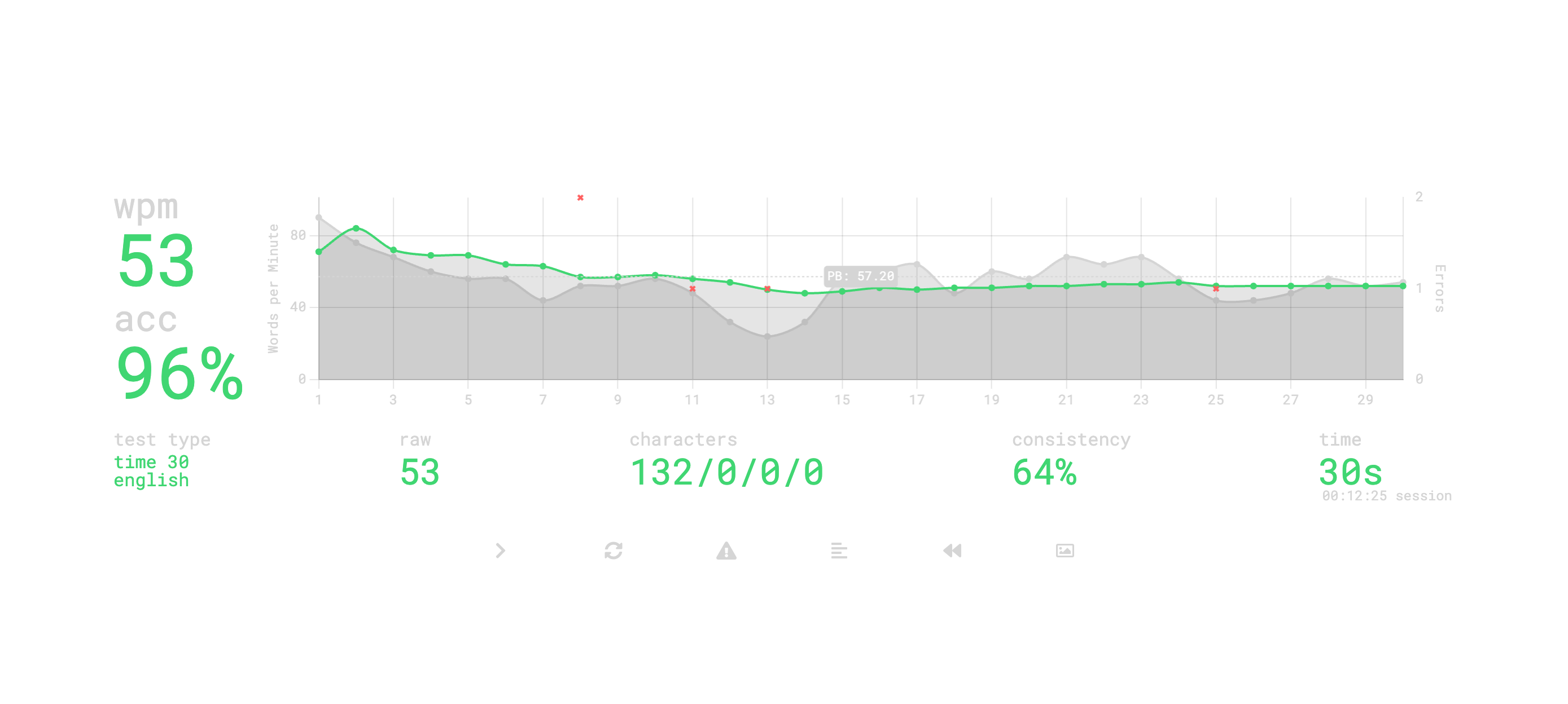
<p>After around a week of working on these sites, I can now type at 50 wpm. This is nearly as fast as I could type before, but now I'm using all 10 fingers. I'm still not as fast as I'd like to be, but I'm making fewer mistakes and I'm still improving.</p>
<p><img src="https://data.paulmcbride.com/images/monkeytype-screenshot.png" alt="The results of a recent test on monkeytype showing 53wpm" class="rounded-lg"></p>
<h2>Whats Next?</h2>
<p>I think this process may have opened an expensive can of worms for me. For the last few years I have used a standard Apple keyboard and never really had any issues, but once I started reading about ergo keyboards, I knew I had to have one. I've not made my mind up on what I want yet, but I have an eye on the <a href="https://www.zsa.io/moonlander/" target="_blank" rel="noopener noreferrer">Moonlander</a> from ZSA. It's a split keyboard with a ton of customisation options.</p>
<p>While I'm mulling over what to buy, I'm experimenting with remapping my current keyboard to make it more comfortable. I use <a href="https://karabiner-elements.pqrs.org/" target="_blank" rel="noopener noreferrer">Karabiner Elements</a> for this. I've moved the <code>Caps Lock</code> is now <code>Esc</code> and when I hold down the <code>Space Bar</code>, it acts as <code>Shift</code>. This does mean more dot files to manage/tinker with. I haven't decided if thats a good thing or not yet.</p>
<p>I'm pretty sure over the next few weeks I'll continue to get faster at typing and I'll probably end up buying a new keyboard. I'll be sure to write about it here when I do.</p><div style="margin-top: 50px; font-style: italic;"><strong><a href="https://paulmcbride.com/posts/i-learned-how-to-type">Read on the website</a>.</strong></div>]]></content>
        <author>
            <name>Paul McBride</name>
            <email>hello@paulmcbride.com</email>
            <uri>https://paulmcbride.com</uri>
        </author>
    </entry>
    <entry>
        <title type="html"><![CDATA[Building a Second Brain]]></title>
        <id>/posts/building-a-second-brain</id>
        <link href="https://paulmcbride.com/posts/building-a-second-brain"/>
        <updated>2023-01-25T00:00:00.000Z</updated>
        <summary type="html"><![CDATA[My review of the book Building a Second Brain by Tiago Forte]]></summary>
        <content type="html"><![CDATA[<p>Building a Second Brain is a book about notes, written by Tiago Forte in June 2022. It covers what Tiago believes to be a productive an useful way to take and use notes. I thoroughly enjoyed this book so below I'll share my summary.</p>
<h2>What is a Second Brain?</h2>
<p>Simply, a second brain is a place to store and organise your notes. It's place to make your ideas concrete. A place that reveals new associations between your ideas. And a place to incubate your ideas over time to sharpen your unique perspective.</p>
<p>Ideally notes added to your second brain should be useful to your future self. The book explains a method that helps make this a reality.</p>
<h2>The CODE Method</h2>
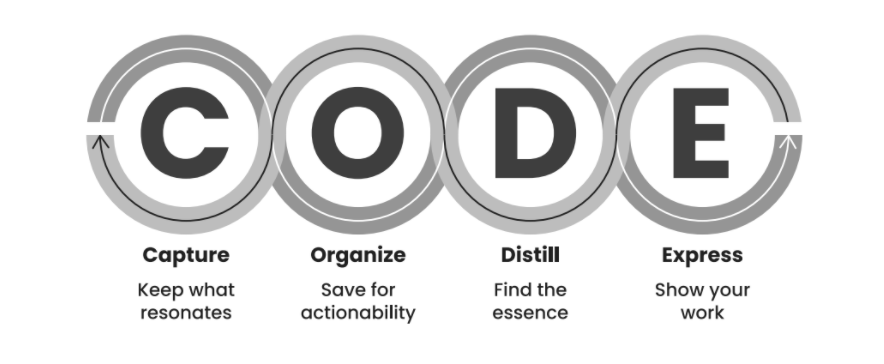
<p>Taking notes that remain useful over time isn't simple. It is hard to predict what future you will need. Tiago uses a 4 step method when taking and working with his notes to make them as useful as possible. It's called the CODE method.</p>
<p><img src="https://data.paulmcbride.com/images/basb-code-method.png" alt="An outline of the CODE method" class="rounded-lg"></p>
<h3>Capture</h3>
<p>The first step is to capture notes. It doesn't really matter what app you use. Just pick one and stick with it for 6 months before worrying about if it's the perfect one or not. Notes should be taken with a curator mindset. If you capture every interesting thing you see, you may as well capture nothing. Instead take notes about things that resonate with you. Don't think too hard about it. This gets easier with practice.</p>
<p>Tiago recommends having a note inbox where unprocessed notes go. That way you can quickly capture notes when working without having to break your flow to figure out where to put it.</p>
<h3>Organise</h3>
<p>Step 2 is organising your notes by actionability using the PARA system. Start by creating 4 folders:</p>
<ul>
<li>Projects</li>
<li>Areas</li>
<li>Resources</li>
<li>Archive</li>
</ul>
<p>Projects should contain a folder for each project you are currently working on. A project is defined as some piece of work with an end date. Something that has a stopping point. For example, writing an article, recording a Youtube video or putting a slide deck together.</p>
<p>Areas are for ongoing projects; things that you need to work on or maintain that don't have an end date lined up. Maintaining your home, the relationship with your partner or fitness for example. Create a folder for each area in your life you want to take notes on.</p>
<p>Resources are similar areas, except there is no maintenance involved. This is where you would take notes on things you are interested in. This is where I store notes on reading, philosophy and money etc.</p>
<p>Finally, the archive folder is for what it sounds like. When you finish a project, move it to the archive. If an area is no longer something you are maintaining move to it the archive too. The archive gets these notes and folders out of your way, but the notes will always be there if you need them or if circumstances change.</p>
<p>By storing your notes this way you optimise for action. After all you're probably not taking notes for the sake of it. You do it to get things done. So when you're processing your notes inbox, start by checking your projects folder. If there is a pending project where the note is relevant place it there. If not, check your areas folder. If you haven't got a project or an area that the note would be useful for, put it in a folder in your resources. Don't worry too much about getting this right, search is your friend.</p>
<p>Your notes should now be in the folder where they are most likely to be useful to you when you need them.</p>
<h3>Distill</h3>
<p>Distilling your notes is the process of making them scannable. You want to have notes that a busy future you will find useful. Tiago uses a process called “Progressive Summarisation”. Your notes should be reasonably concise to begin with. However, you want to make sure that you can get the essence of a note in just a few seconds. Progressive summarisation starts with bolding the most important parts of a note. Then highlight the the most important bolded parts. Finally, for longer notes, you write a short summary.</p>
<p>The time to do this summarisation isn't when you capture or organise the note, but when you next use it in a project or for some other output. At the point you'll be in the best place to know what parts of the note are the most valuable.</p>
<h3>Express</h3>
<p>We have our notes, they're organised by actionability and it's easy to see what the most valuable part of each note is. It's time to put them to work. Modern work is more hectic and fragmented than ever before, so it's important to find a way to be productive despite this. An effective technique is to work on “Intermediate Packets”. These are small chunks of complete work that can be composed into larger projects. Here are a few examples of what an intermediate packet might be. A summary note combining and refining other notes, an outline of the article you want to write or your initial plan for a remodel you want to do in your kitchen.</p>
<p>An intermediate packet is something you can complete in ~20 mins or so. One of the benefits of working in small complete chunks is that you can share early and often. Feedback is a great way to improve the work we produce.</p>
<p>Creating intermediate packets provides an opportunity to use existing notes. Check the project folder for anything that might be relevant. Take a look in your other folders too and make use of search. If you find relevant notes, move them to the project folder. Use them as your reference material. This is also a good time to progressively summarise the notes you use.</p>
<p>A completed project is now just a case of combining and organising intermediate packets.</p>
<h2>The Creative Process</h2>
<p>The way we make and create is always changing but the creative process itself is ancient. We gather info, learn new things or look at them from a different perspective, then we combine those things into something new. We strip away the good to surface the great.</p>
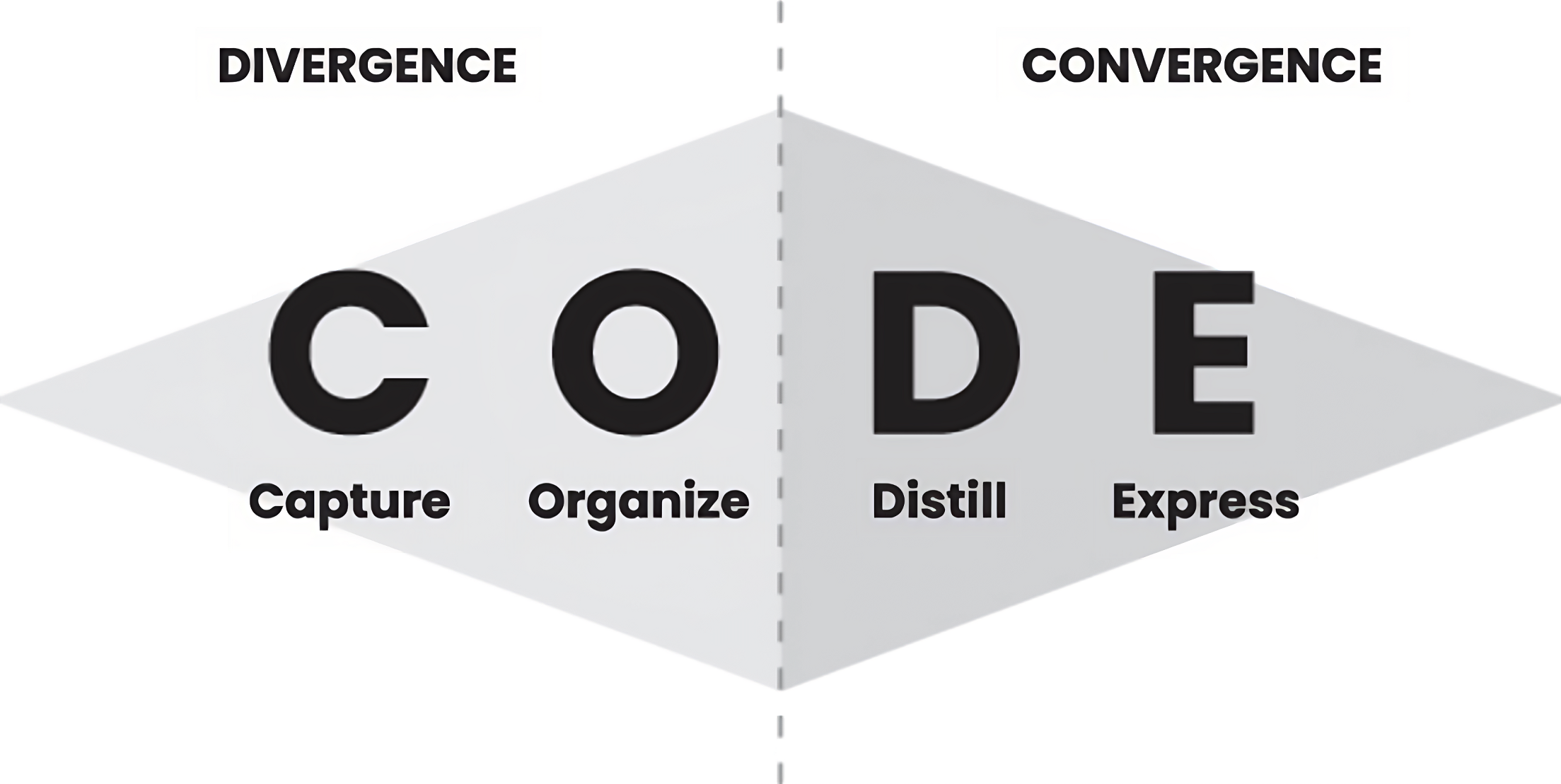
<p>This is a process of divergence then convergence. First you explore all options to see what works and what doesn't. Make prototypes, first drafts, outlines etc. Then it's time to refine and focus in on the best parts. The CODE system builds on this process. Capturing and Organising notes is divergence. Distilling and Expressing is Convergence.</p>
<p><img src="https://data.paulmcbride.com/images/basb-code-divergence-convergence.png" alt="The CODE method showing divergence and convergence" class="rounded-lg"></p>
<h2>Techniques for Getting Work Done</h2>
<p>Tiago mentions a few mentions a few techniques he uses when trying to complete a piece of work.</p>
<h3>The Archipelago of ideas</h3>
<p>When all of your research is complete and it's time to do the work it is useful to gather the most salient ideas into one document. This can include highlights from notes, images or anything else that will help produce the final piece of work. Reorder and add to these highlights until you end up with an outline of the final project. It is a lot easier to get started when you're not starting from a blank page.</p>
<h3>Hemingway Bridges</h3>
<p>When Ernest Hemingway was writing, he'd never finish a session until he knew what he'd write next. He would take notes about what he had planned and leave them for the next session. When he started his next session he'd know exactly where to begin. This is a great way to use yesterday's momentum today.</p>
<h3>Reducing the Scope</h3>
<p>This is a common technique in agile software development. You assign a time budget to a task and when the time is up, you ship what you've done. If you're running out of time on a project and there is risk you won't finish, reduce the scope of the project. The parts that don't make the cut can always be added later or be the basis of a new project. It is better to share a smaller completed project with the world than have an incomplete masterpiece that never sees the light of day.</p>
<h2>Conclusion</h2>
<p>I really enjoyed this book. If you're the kind of person that enjoys productivity systems, you probably will too. If you want to find out more, check out the <a href="https://buildingasecondbrain.com" target="_blank" rel="noopener noreferrer">Building a Second Brain Website</a> I've implemented most of the recommendations this book makes and I'll report back in a few months with how I've faired.</p><div style="margin-top: 50px; font-style: italic;"><strong><a href="https://paulmcbride.com/posts/building-a-second-brain">Read on the website</a>.</strong></div>]]></content>
        <author>
            <name>Paul McBride</name>
            <email>hello@paulmcbride.com</email>
            <uri>https://paulmcbride.com</uri>
        </author>
    </entry>
    <entry>
        <title type="html"><![CDATA[Personal Websites are Important]]></title>
        <id>/posts/personal-websites-are-important</id>
        <link href="https://paulmcbride.com/posts/personal-websites-are-important"/>
        <updated>2023-01-06T00:00:00.000Z</updated>
        <summary type="html"><![CDATA[A personal website gives the freedom to share your ideas, thoughts, and passions with the world on your own terms.]]></summary>
        <content type="html"><![CDATA[<p>Having a personal website is more important and relevant today than it's ever been. With the rise of social media, it is easy to get lost in the noise. A personal website gives you the freedom to share your ideas, thoughts, and passions with the world on your own terms.</p>
<p>At its core, the internet is a tool for human connection. It is a place where we can share what we have to say with the world. A place where we can connect with others and learn from each other. In a lot of ways though, social media has taken that from us. Social media has turned the web into a machine that generates rage and converts that rage into ad revenue. The web, along with social media is headed towards a place where we are just angry consumers.</p>
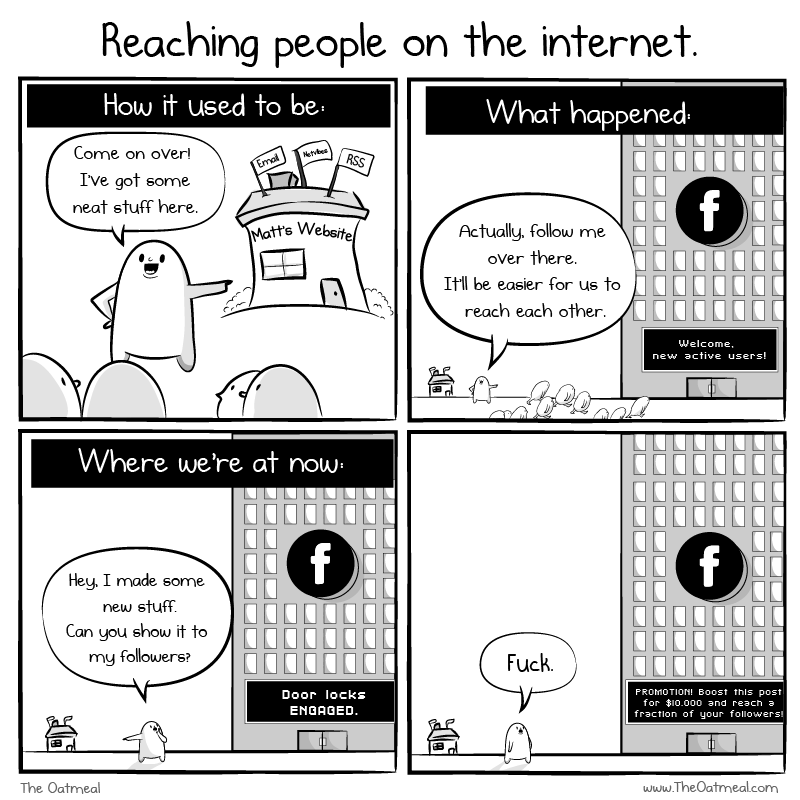
<p>This comic from The Oatmeal sums it up pretty well.</p>
<p><img src="https://data.paulmcbride.com/images/reaching-people-on-the-internet.png" alt="A comic strip from the oatmeal showing how moving from personal websites to social media was a bad idea" class="rounded-lg"></p>
<p>A personal website puts you back in control and empowers you to be a creator.</p>
<h2>You're in control</h2>
<p>One of the first steps to taking control of your online presence is to buy a domain. A domain name is the address of your website. For example, the domain name for this website is <a href="https://paulmcbride.com" target="_blank" rel="noopener noreferrer">paulmcbride.com</a>. You can get one for as little as $10 a year. I recommend <a href="https://www.cloudflare.com/" target="_blank" rel="noopener noreferrer">Cloudflare</a> for buying domains.</p>
<p>Owning your own domain and posting content there is a better alternative to exclusively using social media for a few key reasons.</p>
<p>First and foremost, owning your own domain and website gives you complete control over your online presence and content. When you post content on your own website, you have the freedom to post whatever you want, whenever you want, without worrying about it being taken down or disappearing. No one can sell your content or data without your permission, and you have the power to shape and control your online identity on your own terms.</p>
<p>On social media platforms, on the other hand, you are at the mercy of the platform's algorithms and policies. Your content can be suppressed or removed, and your online identity is shaped by the platform's curation and advertising policies. Also, social media platforms can change their terms of service or be sold to new owners (I'm looking at you Twitter), leading to potential changes in how your content is used or displayed.</p>
<p>In addition to the security and control that comes with owning your own domain, having your own website allows you to build a more professional and cohesive online presence (If that is what you want to do). You can design and customize your website to align with your personal brand and goals, and present a cohesive image to the world. With social media, you are limited by the platform's design and algorithms, and your content can easily get lost in the noise.</p>
<h2>It's fun</h2>
<p>In addition to the practical and personal benefits of having your own website, it is also a lot of fun to build and customize one. With a personal website, you have complete control over the design and content, and can build whatever you want. You can let your creativity and personality shine through and create a website that is uniquely yours.</p>
<p>Whether you want to create a polished website to showcase your skills and experience, or a weird and quirky website that reflects your interests and passions, the possibilities are endless. The only thing you're limited by is your own ability and imagination. Building and maintaining a personal website allows you to exercise your creativity and technical skills. It can be a fun and rewarding hobby.</p>
<h2>It's a great way to learn</h2>
<p>Building a website can be as simple or complicated as you want it to be. If you don't have the technical know how to build a site from scratch, you can start with something like <a href="https://www.squarespace.com/" target="_blank" rel="noopener noreferrer">Squarespace</a> or <a href="https://ghost.org/" target="_blank" rel="noopener noreferrer">Ghost</a>. These platforms allow you to build a website without having to worry about the technical details. You can focus on the content and design.</p>
<p>If however you want to get your hands dirty and build a site yourself, then you have countless options! I use this website to play with and learn tools I wouldn't get the chance to ordinarily. I've used this website to learn <a href="https://reactjs.org/" target="_blank" rel="noopener noreferrer">React</a>, <a href="https://nextjs.org/" target="_blank" rel="noopener noreferrer">Next.js</a>, <a href="https://tailwindcss.com/" target="_blank" rel="noopener noreferrer">Tailwind CSS</a>, and <a href="https://www.typescriptlang.org/" target="_blank" rel="noopener noreferrer">TypeScript</a>. I've also used this website to learn about <a href="https://en.wikipedia.org/wiki/Search_engine_optimization" target="_blank" rel="noopener noreferrer">SEO</a>. There are no rules when you build your own website, so you can use whatever your interested in.</p>
<h2>Should you stop using social media?</h2>
<p>No. Social media can be great for connecting with others and sharing your thoughts and creations. However, if you have something important to say, you should say it on your website first. That content should have a URL that you control. By all means share it on social media too, just make sure your website is the canonical home for your content.</p>
<h2>Conclusion</h2>
<p>In conclusion, having a personal website is a key tool for taking back control of your online presence and becoming a creator. It allows you to share your ideas, thoughts, and passions with the world on your own terms, and gives you the security and control over your content and data. Building and maintaining a personal website can also be a fun and rewarding hobby, allowing you to exercise your creativity and technical skills. Whether you're a professional looking to promote your career or an individual with something to say, a personal website can be a valuable and fulfilling project.</p><div style="margin-top: 50px; font-style: italic;"><strong><a href="https://paulmcbride.com/posts/personal-websites-are-important">Read on the website</a>.</strong></div>]]></content>
        <author>
            <name>Paul McBride</name>
            <email>hello@paulmcbride.com</email>
            <uri>https://paulmcbride.com</uri>
        </author>
    </entry>
    <entry>
        <title type="html"><![CDATA[My SaaS Tech Stack]]></title>
        <id>/posts/saas-tech-stack</id>
        <link href="https://paulmcbride.com/posts/saas-tech-stack"/>
        <updated>2020-06-17T00:00:00.000Z</updated>
        <summary type="html"><![CDATA[A look into the tech choices I made when building the job boards, WeCode NI and WeCode Remote.]]></summary>
        <content type="html"><![CDATA[<p>Building software involves a lot of compromise. Everything has pros and cons. In this article I'd like to share what I used to build <a href="https://wecodeni.com" target="_blank" rel="noopener noreferrer">WeCode NI</a>. It's a job board for developers in Northern Ireland. It's not a complicated app, but has plenty of moving parts including auth, payments and content. I hope this article will help you make decisions about your own projects.</p>
<h2>Hosting</h2>
<p>When picking a hosting provider, I have a few requirements. Basically I want it to be affordable and convenient. I do not want to be managing a server or worrying about uptime. For most of the work I do these days, a serverless solution works best.</p>
<p>That's why for hosting, I use <a href="https://vercel.com" target="_blank" rel="noopener noreferrer">Vercel</a>. Vercel is a serverless hosting platform with a generous free tier. I can push my code to Github and a few minutes later, it's live. My pull requests get deployed to staging urls for me to test and I can have multiple environments each with different configurations.
The whole platform is backed by a smart CDN which helps static sites perform even better and ensures that my sites are always snappy and reliable.</p>
<h2>Framework</h2>
<p>When building a job board, server rendered HTML is very important for SEO. It puts you in control of how search engines see your pages.</p>
<p>My framework of choice is <a href="https://nextjs.org" target="_blank" rel="noopener noreferrer">Next.js</a>. Next.js is a fullstack JavaScript framework from the same folks that make Vercel. It can be used to build dynamic sites, static sites, APIs and projects that mix them all together.</p>
<p>One of the reasons I use Next.js is for its static regeneration feature. I can create a static page at build time but ensure it is always up-to-date by rebuilding in the background. Next.js makes this really easy to do. Check out the homepage or any job page on weCode Remote or WeCode NI to see it in action.</p>
<p>I use the Next.js API routes to power a GraphQL endpoint. This endpoint is what powers the admin interface and is consumed by all the job pages too.</p>
<h2>Data</h2>
<p>All data is stored in a MYSQL database running on <a href="https://planetscale.com/" target="_blank" rel="noopener noreferrer">PlanetScale</a>. I don't need or use their geographic replication feature as the vast majority of users to the site are based in Northern Ireland. I chose PlanetScale because they have a generous free plan and it is serverless. I don't have to worry about scaling or managing a database.</p>
<h2>Authentication</h2>
<p>When I originally built the site I used Firebase for my backend and Auth. It worked well but there were several drawbacks. Firstly, at the time, the Firebase SDK was huge. Almost half of the JavaScript shipped with each page was just firebase auth code and when you consider most users never need to log in, it was a real waste. Secondly, I've never been a huge fan of Google and their privacy policies. I didn't want to be relying on them for my authentication.</p>
<p>So, when I rebuilt the site I decided to use NextAuth. It's a library that makes it easy to add authentication to your Next.js app. It supports a wide range of providers including email, GitHub, Twitter etc. The data is store in my own database so if I ever want to move away from NextAuth, I can.</p>
<h2>Payments</h2>
<p>You'll not be surprised to hear that my payments are handled by Stripe. I use Stripe Checkout. This is a prebuilt UI for taking card payments. When a user is ready to pay, I redirect them to a checkout page on Stripe where the transaction is handled. This way, a user never enters payment details on my site. Ensuring a website meets the legal requirements to process payments is hard, so I've left that liability in Stripe's capable hands. When Stripe successfully charges the user, they send me a webhook and the user's draft job goes live.</p>
<h2>Content</h2>
<p>I use <a href="https://prismic.io" target="_blank" rel="noopener noreferrer">Prismic</a> to manage the content on the site. It's a headless CMS which means I can use it to manage the content on my site without having to build a custom admin interface. If I were to build the site again, I'd probably user Markdown files for the content. It rarely changes and I don't need a full blown CMS for it.</p>
<h2>API Layer</h2>
<p>I use <a href="https://www.apollographql.com/docs/apollo-server/" target="_blank" rel="noopener noreferrer">Apollo Server</a> to power my GraphQL API. This is by far my biggest pain point when working on the site. It's tricky to test, I have to write my types twice (TypeScript and GraphQL) and I have to write a lot of boilerplate code to get it working. I've worked with tRPC recently and I think I'd use that if I were to build the site again.</p>
<h2>Email</h2>
<p>I use <a href="https://postmarkapp.com" target="_blank" rel="noopener noreferrer">PostMark</a> to send emails. It's a transactional email service which means I can send emails to users when they sign up or login, when they pay and when their job goes live. It's a really simple service to use and it's very affordable. I also like that they are independently owned.</p>
<h2>What I'd do differently</h2>
<p>While I love all the tools I`ve used for building <a href="https://wecodeni.com" target="_blank" rel="noopener noreferrer">WeCode NI</a>, there are some things that aren't perfect. As time has gone on I've replaced a lot of the parts I didn't like. I swapped Firebase for NextAuth and I'm planning to move away from Prismic. I'd also like to move away from Apollo Server and use tRPC instead.</p>
<p>That said, the site works and makes me money. As the saying goes "if it ain't broke, don't fix it". I'm happy with the site and I'm not going to spend time on it unless I have to. I'm sure I'll be back to update this article in the future though.</p><div style="margin-top: 50px; font-style: italic;"><strong><a href="https://paulmcbride.com/posts/saas-tech-stack">Read on the website</a>.</strong></div>]]></content>
        <author>
            <name>Paul McBride</name>
            <email>hello@paulmcbride.com</email>
            <uri>https://paulmcbride.com</uri>
        </author>
    </entry>
    <entry>
        <title type="html"><![CDATA[What I want from life]]></title>
        <id>/posts/what-i-want-from-life</id>
        <link href="https://paulmcbride.com/posts/what-i-want-from-life"/>
        <updated>2020-05-18T00:00:00.000Z</updated>
        <summary type="html"><![CDATA[Success looks different to each person. This is what success looks like for me and what I want to get out of my time on earth.]]></summary>
        <content type="html"><![CDATA[<p>What success looks like will be different for each person. What someone wants out of life will depend on what they have now, how they grew up, and what stage of life they are at.</p>
<p>In this article I'll share what I want from life. By sharing these details, I hope I'm more likely to achieve the things I want and that I'm more likely to be held accountable for my goals.</p>
<p>I've spent a lot of time thinking about what makes me happy but I don't think I've ever really been able to put my finger on it. Like most people, the things I want have changed throughout my life. It wasn't until recently I decided that happiness shouldn't be my goal. Happiness comes and goes. That's a normal part of being human. If I set my sights on permanent happiness I'd be setting myself up to fail.</p>
<p>For me, finding purpose is more important.</p>
<p>As Steve Jobs famously said:</p>
<blockquote>
<p><em>If you love what you do, you'll never work a day in your life</em></p>
</blockquote>
<p>Steve was wrong. If you find a job you love, you'll work a hell of a lot, but you'll enjoy it. That's kind of where I'm at right now. I love writing code and more importantly I love solving problems. Before I was getting paid to build things on the web, I was doing it for fun.</p>
<h2>I want the freedom to decide what I work on and when I work</h2>
<p>Essentially, I want to be able to decide how I spend my time. I want to be able to take downtime when I need it and get stuck into the work I enjoy when I'm feeling motivated. I genuinely love the work I do and I want to make sure it stays that way. My wife Ellie and I are working hard towards this goal. Basically, we need to save a lot of money and we need to build up some level of passive income. That way, a full time job is not a requirement. That's not to say I won't have a full time job when we reach that point, it just means it'll be on my terms.</p>
<p>We still have some way to go before this becomes a reality but we're on track. We're currently saving to move to the US in early 2024 all being well.</p>
<p>The next goal of mine isn't related to money or work.</p>
<h2>I want to build a life long habit of daily exercise</h2>
<p>This is just as important as financial freedom. What would be the point of having all the money and time in the world if you didn't have the health to enjoy it. Throughout my life I've cycled through phases of training a lot, to months where the only exercise I would do is walking to and from the office. Recently that has been changing though. I've become more consistent by following the “two day rule”. Basically, I plan to work out everyday. I can skip a day whenever I like, but I can never miss two workouts in a row. My current work out plan is 30 mins of kettlebell training, 4 times a week. On days when I'm not doing kettlebells, I'll do a minimum of a 30 min walk.</p>
<p>When you want to make something a core part of your life, you need to do it everyday. At least at the start. When you do something every day, it becomes part of your routine. It's not the exception or something that gets in the way, it's just part of your day, everyday. To make sure I would stick with this plan, I decided on a workout that would take less than 30 minutes and could be done at home. That way I could never make the excuse that the weather was bad or I didn't have time. For me, the workout that fits my life best is kettlebell training.</p>
<h2>I want to live in a way that is sustainable and positive for the planet</h2>
<p>It is the responsibility of every person alive to leave the planet in a better state than it was when they arrived. I whole heartedly believe this. In practice this means I rarely eat meat at home, I avoid air travel when I can, and vote for political parties that support green initiatives. I also rarely buy new clothes. A lot of my clothes are years old and have been repaired several time. In a few years, when we move to Oregon (where my wife is from), we plan on building or buying a small house and growing as much of our own food as we can.</p>
<p>Some people might look at my lifestyle choices and see them as sacrifices, but I don't think of it like that. I like the slower pace of life that living like this encourages.</p>
<h2>I want to do work that matters</h2>
<p>This is a tricky one. What is work that matters? I think it is work that has a positive impact on the lives of other people. I'm not pretending I'm going to change the world, I just want to do work that moves the needle in the right direction. What I think this will mean for me is teaching.</p>
<p>I've been able to build a pretty comfortable life for myself through writing code. I want to help other people enjoy the same opportunities that I have. I'm already an <a href="https://egghead.io/instructors/paul-mcbride?af=auhexg" target="_blank" rel="noopener noreferrer">egghead instructor</a> so I'm heading in the right direction. That said, it has been a few years since I've published a course. I'm hoping to change that soon.</p>
<h2>I want to enjoy the journey</h2>
<p>When setting goals around what you want out of life I think it is easy to get tunnel vision. You can get so focused on the end goal that you forget to enjoy the journey. I've been guilty of this in the past. I've been so focused on the end goal that I've missed out on the fun of the journey. I'm trying to be more mindful of this now. I'm trying to enjoy the process of getting to where I want to be. There is more to life than work. Over the past few years I've been learning to fly (I know, that contradicts my previous point about trying to fly less.). I want to spend more of my time doing things like that.</p>
<h2>Whats next?</h2>
<p>Things are on track for me right now. I need to keep reminding myself to enjoy the journey. I have a bunch of goals I'm working on, but when I get there, I'll probably have new ones. Enjoying the day to day is what makes for a good life.</p>
<p>I know this post isn't at all tech related, but hopefully you found it interesting anyway. What about you? What do you want from life?</p><div style="margin-top: 50px; font-style: italic;"><strong><a href="https://paulmcbride.com/posts/what-i-want-from-life">Read on the website</a>.</strong></div>]]></content>
        <author>
            <name>Paul McBride</name>
            <email>hello@paulmcbride.com</email>
            <uri>https://paulmcbride.com</uri>
        </author>
    </entry>
    <entry>
        <title type="html"><![CDATA[Don't Trust the Cascade]]></title>
        <id>/posts/dont-trust-the-cascade</id>
        <link href="https://paulmcbride.com/posts/dont-trust-the-cascade"/>
        <updated>2019-03-21T00:00:00.000Z</updated>
        <summary type="html"><![CDATA[CSS in it's current form is not a good fit for how we build websites. I now write CSS in JavaScript and I think you should too.]]></summary>
        <content type="html"><![CDATA[<blockquote>
<p><strong>Note:</strong> My opinion on this as softened substantially since 2019. Mostly because there are now good options to opt out of the global nature of css when it makes sense ie. CSS modules and CSS Cascade Layers.</p>
</blockquote>
<p>If you've been on the internet recently, you've probably heard of CSS-in-JS.</p>
<p>The technology has been growing in popularity recently but not everyone is a fan. Today, I'd like to shed some light on what it is and help you decide if it is right for your next project.</p>
<p><img src="https://data.paulmcbride.com/images/the-c-in-css.png" alt="The C in CSS" class="rounded-lg"></p>
<p>CSS-in-JS can mean a few things, but primarily it is used to describe the technique of authoring styling logic in JavaScript. In React this can be done in the form of <a href="https://reactjs.org/docs/dom-elements.html#style" target="_blank" rel="noopener noreferrer">inline styles attached to a react component</a> or by leveraging a tool like <a href="https://www.styled-components.com/" target="_blank" rel="noopener noreferrer">Styled Components</a>. Don't worry if you don't use React though, there are libraries out there for every framework. There are even libraries you can use <a href="https://cssinjs.org/" target="_blank" rel="noopener noreferrer">without a framework</a>.</p>
<p>Now, if you're anything like me, when you first heard the term CSS-in-JS you probably thought:</p>
<blockquote>
<p>Oh great... something else I have to learn!</p>
</blockquote>
<p>I have good news though! If you already know CSS, you don't have to learn anything new. But wait, if you already know CSS, then why bother writing CSS-in-JS, doesn't that just add complexity?</p>
<h2>Why I Write CSS-in-JS 🎨</h2>
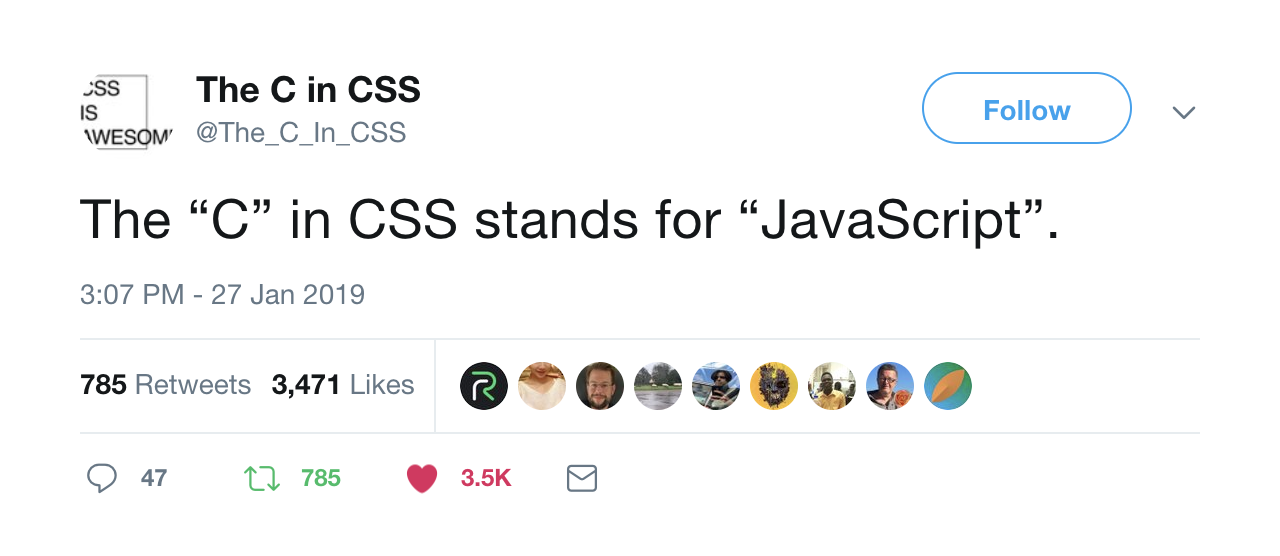
<p>CSS stands for Cascading Style Sheets. Back when CSS was created, we were building websites which were simple by today's standards. At the time, the <em>cascading</em> part of CSS was super useful. Today, however, I think it ends up being a foot-gun more often that it is helpful. Think about it, can you remember every class name you used on your last project?</p>
<p>Now imagine working on a project with several other people. Writing CSS that conflicts with or overwrites someone else's styles is essentially inevitable. Techniques like BEM and SMCSS can help but you have to rely on all developers following the rules and as a project grows so do the chances that someone will slip up.</p>
<p>For me, CSS-in-JS help save me from myself. I'm protected from my own mistakes by an API instead of by convention. CSS-in-JS allows me to focus on styling my UI without having to be mindful of overwriting CSS somewhere else.</p>
<p>The cascade can still be useful, however. With CSS-in-JS, you can still take advantage of the cascade. The difference is that the scope of the cascade is limited and controlled by you. You <strong>can</strong> have your cake and eat it.</p>
<h3>Performance 🚀</h3>
<p>Okay, let's say you never make mistakes. Are there any benefits to CSS-in-JS besides controlling the cascade. As it turns out, there are. CSS-in-JS libraries are responsible for how styles are injected into the DOM. They can track which components are rendered and inline the appropriate styles for best performance.</p>
<p>This means the user ends up making fewer round trip to the server and even downloading fewer bytes of code. That means a quicker time to first paint. Great success.</p>
<h3>Maintenance 🔧</h3>
<p>Have you ever wanted to remove some CSS from a project but you had no way to be sure it wasn't being used somewhere. With CSS-in-JS, this usually isn't a problem as styles are typically co-located with the component that relies on them. You'll never have to go hunting for the CSS that is affecting the component your working on again.</p>
<h3>Dynamic Styles</h3>
<p>Another benefit of using CSS-in-JS is that you can take advantage of JavaScript. You can use functions to create mixins and reusable style modules, props can be used to create variations of components and variables can be used for theming.</p>
<p>Most CSS-in-JS tools give you all the benefits of traditional CSS preprocessors too, including nested rules and auto-vendor prefixing.</p>
<h2>What are the disadvantages of CSS-in-JS</h2>
<p>All tech choices involve compromise and using CSS-in-JS is no different. The primary drawback of using something like Styled Components is the added complexity. First of all, it needs to be installed from npm. Not a big deal, but it is one extra step.</p>
<p>If you are sever rendering your code, you're going to need to install and configure a babel plugin to make sure your styles work on the first load too. (This is how it know which styles in can inline etc.)</p>
<p>The other drawback of CSS-in-JS is that it just might not work for your particular application. If you're not using a front end framework like React or Vue, CSS-in-JS is probably not the right choice.</p>
<p>If you're in a situation where CSS-in-JS isn't a great fit, I highly recommend you check out <a href="https://tailwindcss.com/" target="_blank" rel="noopener noreferrer">Tailwind CSS</a>. It is a utility first CSS framework that helps you build UI's rapidly. You don't get any of the benefits of CSS-in-JS but it may help you avoid some of the pitfalls of CSS.</p>
<h2>Closing thoughts</h2>
<p>As developers, our job is to solve problems using code. CSS-in-JS is a tool that can help us solve problems more efficiently and write code that should be easier to maintain.</p>
<p>If you've tried a CSS-in-JS solution and it didn't work out, that's cool too. Do what works best for you and your team.</p>
<p>Let me know if you have used CSS-in-JS and what problems it solved/caused for you!</p><div style="margin-top: 50px; font-style: italic;"><strong><a href="https://paulmcbride.com/posts/dont-trust-the-cascade">Read on the website</a>.</strong></div>]]></content>
        <author>
            <name>Paul McBride</name>
            <email>hello@paulmcbride.com</email>
            <uri>https://paulmcbride.com</uri>
        </author>
    </entry>
    <entry>
        <title type="html"><![CDATA[Things I don't know at the start of 2019]]></title>
        <id>/posts/things-i-dont-know-2019</id>
        <link href="https://paulmcbride.com/posts/things-i-dont-know-2019"/>
        <updated>2019-01-20T00:00:00.000Z</updated>
        <summary type="html"><![CDATA[Life as a developer is a life of constant learning. I've taken stock of some of the things I don't know at the beginning of 2019]]></summary>
        <content type="html"><![CDATA[<p>I recently read an article by <a href="https://overreacted.io/things-i-dont-know-as-of-2018/" target="_blank" rel="noopener noreferrer">Dan Abramov</a> where he listed all of the technologies he wasn't familiar with. Dan is someone I look up to and seeing this kind of honesty from him only added to my respect.</p>
<p>After reading his article I took stock of what I know and where my blind spots are and thought I'd put together a list of my own.</p>
<p>For the record, this is a list of the things I know I don't know. There are so many things I don't know I don't know!</p>
<p>So, without further ado, here is my list.</p>
<ul>
<li>
<p><strong>Typescript</strong> - Honestly, I've not even looked at Typescript. The language is taking off right now, but I've just not needed to use it yet.</p>
</li>
<li>
<p><strong>Big O Notation</strong> - I know it's a thing that can describe how complicated an algorithm is for a computer to process. At least, I'm pretty sure that's what it is. However, I don't know the notation or how to work it out.</p>
</li>
<li>
<p><strong>HTTPS</strong> - How do you even set up an SSL manually? If it weren't for Cloudflare and Let's Encrypt, I would be in trouble.</p>
</li>
<li>
<p><strong>Low-level languages</strong> - I've never worked with any low-level languages. Memory allocation and garbage collection sound complicated and I don't need to know it for the work I do right now.</p>
</li>
<li>
<p><strong>Java</strong> - It seems like most people when they are learning to code, learn Java. I didn't learn to code at university or college so I never learnt Java.</p>
</li>
<li>
<p><strong>Kubernetes</strong> - I would love to learn how to use Kubernetes, but every time I try, I get overwhelmed and give up.</p>
</li>
<li>
<p><strong>Linux</strong> - I know basic command line utilities, but setting up a Linux server would be way beyond my skill/comfort level.</p>
</li>
<li>
<p><strong>Dev-ops</strong> - Running a server scares me a little. There is so much that can go wrong. At my current place of work, I make deployments on a regular basis, but I hate touching the server, if something goes wrong, I wouldn't know where to start.</p>
</li>
<li>
<p><strong>Testing</strong> - It's a little shameful to admit, but I've barely written automated tests. It's like exercise. I know it's good for me, but I just can't get the motivation to do it.</p>
</li>
<li>
<p><strong>SQL</strong> - Another slightly embarrassing gap in my knowledge is that my understanding of SQL is very patchy. I work with it regularly, but I never feel like I 100% know what I'm doing. I check the docs a lot!</p>
</li>
<li>
<p><strong>SVG</strong> - SVGs are amazing! I've seen several of <a href="https://twitter.com/sarah_edo" target="_blank" rel="noopener noreferrer">Sarah Drasner's</a> creations and tutorials, but when I sit down and try and do something cool with SVGs it ends poorly.</p>
</li>
<li>
<p><strong>Canvas</strong> - Nope!</p>
</li>
<li>
<p><strong>Angular</strong> - I've played around with the first version of Angular, but I've not looked at it since.</p>
</li>
<li>
<p><strong>Service Workers</strong> - I have an irrational fear that adding a service worker to a website and making a mistake would lead to permanently breaking it.</p>
</li>
<li>
<p><strong>Web components</strong> - They may be the new standard for building reusable user interface components, but I know very little about how they work.</p>
</li>
<li>
<p><strong>AI / Machine Learning</strong> - I think machine learning is going to be so important over the coming years and I really need to spend some time learning how to use it.</p>
</li>
<li>
<p><strong>Animation</strong> - I work a lot on front-end development and I bit embarrassed to admit that animation is something I really suck at. I know when an animation looks good or bad, but I struggle to create them myself.</p>
</li>
</ul>
<p>Knowing where your blind spots are is important. If I have to work on a project that needs these skills, I know I'll either need help or some time to study.</p>
<p>So much of being successful as a developer is knowing enough about a subject to know what to search for on google. I don't know everything and that's okay.</p>
<h2>Conclusion</h2>
<p>Developers are problem solvers and at the end of the day, that is the skill we get paid for. New tools and languages and be picked up pretty quickly so don't worry too much about what you don't know. Instead, focus on using what you do know to solve problems.</p><div style="margin-top: 50px; font-style: italic;"><strong><a href="https://paulmcbride.com/posts/things-i-dont-know-2019">Read on the website</a>.</strong></div>]]></content>
        <author>
            <name>Paul McBride</name>
            <email>hello@paulmcbride.com</email>
            <uri>https://paulmcbride.com</uri>
        </author>
    </entry>
    <entry>
        <title type="html"><![CDATA[Up and Running with Webpack 4]]></title>
        <id>/posts/webpack-4</id>
        <link href="https://paulmcbride.com/posts/webpack-4"/>
        <updated>2018-03-04T00:00:00.000Z</updated>
        <summary type="html"><![CDATA[Webpack 4 has finally been released and it is pretty great! If you are looking for zero config JavaScript bundling, then Webpack 4 is the tool for you!]]></summary>
        <content type="html"><![CDATA[<p>After much anticipation, Webpack 4 has finally been released and it is pretty great! If you are looking for zero config JavaScript bundling, then Webpack 4 is the tool for you. In this article, we’ll talk about the changes made from version 3 and how to get up and running with Webpack 4.</p>
<p>Before we dive too deeply into what’s new in Webpack 4, let’s quickly recap what Webpack actually is. Webpack is a module bundler. It takes care of care of compiling and transpiring code and assets into production-ready bundles. This includes transpiling JavaScript that uses modern ESNext features into a bundle that works in today’s browsers. Webpack can bundle basically anything if you use the correct loader.</p>
<h2>What’s new in Webpack 4</h2>
<p>So what has actually changed?</p>
<h3>Webpack 4 is fast</h3>
<p>A lot of work has been done under the hood in Webpack 4 and this has resulted in it being much faster. In some cases, build times have been reduced by up to 98%.</p>
<h3>Mode Configuration</h3>
<p>In an attempt to simplify Webpack config, a <code>mode</code> option has been introduced. This value can be set to <code>production</code> or <code>development</code>. In development mode Webpack does all the things you would expect; better tooling for debugging, useful error messaging and faster incremental builds. In production mode, the output bundle is minified and optimised for runtime performance. Development-only code is also omitted from the bundle to help reduce the overall size.</p>
<h3>CommonsChunkPlugin has been deprecated</h3>
<p>The plugin used for splitting the output bundle into multiple smaller bundles has been deprecated. Instead, this functionality is baked in and is configurable using the <code>optimize.splitChunks</code> option.</p>
<h3>WebAssembly Support</h3>
<p>As long as you have a loader which can handle the language the WebAssembly file is written in, you can now directly import WebAssembly files.</p>
<h3>Zero Config Setup</h3>
<p>One of the most exciting changes in Webpack 4 is that it can now be used without any setup. This is down to some new sensible defaults.</p>
<h2>Getting started</h2>
<p>Now that we know what has changed, let’s look at how we could use Webpack in a new project. By default, it will look for <code>./src/index.js</code> as the entry point. Webpack will then bundle it up and emit it to <code>./dist/main.js</code>. So, if you have an <code>index.js</code> in your <code>src</code> folder, all you need to do after installing Webpack is run <code>webpack –mode development</code> for development mode or <code>webpack –mode production</code> for production mode.</p>
<p>Simple, right? Obviously, there is a lot more to Webpack. It is super configurable and you can make it do pretty much anything you want. If you want to learn more about how you can configure it, check out the official documentation. <a href="https://webpack.js.org/" target="_blank" rel="noopener noreferrer">https://webpack.js.org/</a></p>
<h2>Conclusion</h2>
<p>Webpack 4 has been released and it has a lot of benefits over previous versions. You should upgrade if you can!</p><div style="margin-top: 50px; font-style: italic;"><strong><a href="https://paulmcbride.com/posts/webpack-4">Read on the website</a>.</strong></div>]]></content>
        <author>
            <name>Paul McBride</name>
            <email>hello@paulmcbride.com</email>
            <uri>https://paulmcbride.com</uri>
        </author>
    </entry>
    <entry>
        <title type="html"><![CDATA[Pure Functions – Functional Programming in JavaScript]]></title>
        <id>/posts/pure-functions</id>
        <link href="https://paulmcbride.com/posts/pure-functions"/>
        <updated>2017-11-30T00:00:00.000Z</updated>
        <summary type="html"><![CDATA[Pure functions have no side effects and and they always return the same results given the same arguements. Let's find out how they work.]]></summary>
        <content type="html"><![CDATA[<p>In this episode of Functional Programming in JavaScript, we discuss pure functions.</p>
<p>You probably already use pure functions all the time and are unaware of what they are or what advantages they bring to your code base. Watch the Youtube below to find out why pure functions are better and much more.</p>
<hr>
<h2>Pure Functions - Functional Programming in JavaScript</h2>
<p><a href="https://www.youtube.com/watch?v=Jh_Uzqzz_wM">Watch: Pure Functions - Functional Programming in JavaScript</a></p>
<hr>
<h2>Video Transcript</h2>
<p>Hello, my name is Paul McBride and you're watching this series on functional programming in JavaScript. This is the fourth episode in this series so if you've not even any the previous ones, you'll be able to find a link to them up here.</p>
<p>In this episode, we're gonna be talking about pure functions what they are and how to use them. So what is a pure function? For a function to be considered pure it has to follow two simple rules.</p>
<p>The first one is that it has to be deterministic. That means that given the same inputs it will always return the same output. Let's take a look at an example of a few deterministic and a few non-deterministic functions.</p>
<p>Okay, so in this example, we have a deterministic function. No matter how many times we call the square function if we pass in the same value we'll get the same result. So if we pass in 3 we will get 9 every single time we call that function. Now let's take a look at a non-deterministic function. This is one I wrote earlier I'm gonna paste it in. This function, similar the last one takes a number is an argument and multiplies it by a random number between 1 and 10.</p>
<p>Now, every time we call this function we have no way to guarantee what the value is going to be. This is a non-deterministic function. This is obviously a very simple example of what one is and there are more complicated more real-life scenarios, for example, a function which connects to an API or speaks to a database is a non-deterministic function because we can't guarantee the results of what they're going to return. The database might fail or the server that you're connecting to might not be online.</p>
<p>The second rule that pure functions must follow is that they can't have side-effects. Now, what this means is that a pure function isn't allowed to alter variables outside of its own scope. If the variable isn't passed in, the function shouldn't know about it and shouldn't operate on it in any way. Let's have a look at an example of what that means.</p>
<p>So here we have an example of an impure function. We have an array of animals here cat, dog and fish. We have a function which pushes a new animal into an array and then on line 8 we're calling that function and we're going to print out the results. We print out the new animals first and then the original animals.</p>
<p>Alright, as I said, this is an impure function. It has a side effect and it's probably not immediately obvious. So let's run the code and see what we get. They're both the same. What!? Essentially what's happening here is that this push function has side effects. It affects the original array. It doesn't create a new one and return a new value.</p>
<p>Let's have a look instead of how we could do this in a way that is pure and doesn't have any side effects. In this example, I've altered the code very slightly on line four. Instead of using <code>array.push</code> to add the horse into the new array, we're using the spread syntax. We create a new array, we add the animal, in this case, a horse to the start of that and then, we use spread to pluck each item out of this animals array and place it into this new array that we're returning.</p>
<p>So if we run this code we should find that the original animals array is no longer changed and the new animals array has horse pushed in. So, let's run that and see what we get. Awesome! So, as we've seen there, original animals remains unchanged.</p>
<p>Now that we know what pure functions are let's discuss a little bit about why we would use them and what kind of benefits they bring to your code base.</p>
<p>The first benefit is that pure functions are incredibly easy to reason about. It's easy to understand what the function does and given a certain set of inputs you'll always get the same result. This means that those functions can be passed around your application, used in different parts for that every whirring that it doesn't have a particular bit of state in your app somewhere that it needs to work properly.</p>
<p>Another advantage of pure functions is that they're really easy to test because pure functions don't rely on external state variables it's easy to mock up every part of what that function does.</p>
<p>Javascript is a multi-paradigm programming language. What this means is that it can be used for different programming approaches including functional programming or object-oriented programming in several other different types. As a result, it's not perfect at any one. When you're writing functional JavaScript there are a few gotchas you have to be aware of such as the push on the array object. There are a lot more. They're pretty easy to find online. So, there are just things you need to be aware of if you're trying to write functional code in JavaScript.</p>
<p>That brings us to the end of this episode of functional programming in JavaScript. Hopefully, you understand a little bit better about what pure functions are and how they fit into functional programming. If you have any questions get in touch with me I'll do my best answer. If you've enjoyed this episode then please feel free to subscribe to my channel or sign up to my email list and I will see you in the next episode.</p>
<p>Bye!</p><div style="margin-top: 50px; font-style: italic;"><strong><a href="https://paulmcbride.com/posts/pure-functions">Read on the website</a>.</strong></div>]]></content>
        <author>
            <name>Paul McBride</name>
            <email>hello@paulmcbride.com</email>
            <uri>https://paulmcbride.com</uri>
        </author>
    </entry>
    <entry>
        <title type="html"><![CDATA[Reduce – Functional Programming in JavaScript]]></title>
        <id>/posts/reduce-function-javascript</id>
        <link href="https://paulmcbride.com/posts/reduce-function-javascript"/>
        <updated>2017-11-23T00:00:00.000Z</updated>
        <summary type="html"><![CDATA[In this episode, we look at the reduce function and how to use it. We will use it to transform an array into an object and use it to recreate the filter.]]></summary>
        <content type="html"><![CDATA[<p>In this episode, we look at the reduce function and how to use it. Reduce is a massively flexible function. In this video, we use it to transform an array of data into an object and use it to recreate the filter function.</p>
<h2>How it's used</h2>
<p>An example of how the <code>reduce</code> function can be used to total all values in an array of objects.</p>
<pre class="language-javascript"><code class="language-javascript code-highlight"><span class="code-line"><span class="token keyword">const</span> array <span class="token operator">=</span> <span class="token punctuation">[</span><span class="token punctuation">{</span> <span class="token literal-property property">value</span><span class="token operator">:</span> <span class="token number">1</span> <span class="token punctuation">}</span><span class="token punctuation">,</span> <span class="token punctuation">{</span> <span class="token literal-property property">value</span><span class="token operator">:</span> <span class="token number">3</span> <span class="token punctuation">}</span><span class="token punctuation">,</span> <span class="token punctuation">{</span> <span class="token literal-property property">value</span><span class="token operator">:</span> <span class="token number">2</span> <span class="token punctuation">}</span><span class="token punctuation">,</span> <span class="token punctuation">{</span> <span class="token literal-property property">value</span><span class="token operator">:</span> <span class="token number">1</span> <span class="token punctuation">}</span><span class="token punctuation">]</span><span class="token punctuation">;</span>
</span><span class="code-line">
</span><span class="code-line"><span class="token keyword">const</span> total <span class="token operator">=</span> array<span class="token punctuation">.</span><span class="token function">reduce</span><span class="token punctuation">(</span><span class="token punctuation">(</span><span class="token parameter">total<span class="token punctuation">,</span> object</span><span class="token punctuation">)</span> <span class="token operator">=></span> <span class="token punctuation">{</span>
</span><span class="code-line">  <span class="token keyword">return</span> total <span class="token operator">+</span> object<span class="token punctuation">.</span>value<span class="token punctuation">;</span>
</span><span class="code-line"><span class="token punctuation">}</span><span class="token punctuation">,</span> <span class="token number">0</span><span class="token punctuation">)</span><span class="token punctuation">;</span>
</span><span class="code-line">
</span><span class="code-line">console<span class="token punctuation">.</span><span class="token function">log</span><span class="token punctuation">(</span>total<span class="token punctuation">)</span><span class="token punctuation">;</span> <span class="token comment">// 7</span>
</span></code></pre>
<hr>
<h2>Reduce - Functional Programming in JavaScript</h2>
<p><a href="https://www.youtube.com/watch?v=iT8qyI3ZOuo">Watch: Reduce - Functional Programming in JavaScript</a></p>
<hr>
<h2>Video Transcript</h2>
<p>Hello and welcome back to this series of functional programming in JavaScript. If you've not seen any of the previous episodes I'll put a link up here and you can check those out. In today's episode, we're gonna have a look at the reduce function.</p>
<p>Before we get started looking at some code, let's talk about what reduce actually does. Now, if you've never used reduce before you're probably gonna have your mind blown. In a lot of ways reduce is just like map or filter. It's part of the array object and it's used for transforming data in an array. There's one key difference though and that is that reduce doesn't have to return an array. It can return any kind of data structure.</p>
<p>One of the other cool things about reduce is that it can actually be used to implement the other functions used on the array. For example, you can use reduce to write a map and we're gonna have a look at that today in this example.</p>
<p>Now let's have a look at some code. In this example we're using exactly the same data we have for the past two. We're going to use reduce to transform this array of users into an object of users where the key for each item in that object is the users ID and the value will be the user. Let's see how we would do that using reduce.</p>
<p>We'll get started by creating a new variable to hold this users object. Now, reduce is a little bit like map and filter in that it takes a callback function as its first argument. That callback function then takes two arguments and this is where it differs a little bit from map and filter.</p>
<p>The first argument is the accumulator so we'll just call it accumulator for now, and the second argument is the actual item that we're iterating over so we'll call that user in this case. Reduce actually takes a second argument which is required and that argument will be what is passed into the accumulator on the first loop over.</p>
<p>So, in this case, we want it to be an empty object literal. Because the data ultimately we're gonna be returning is an object so it makes sense to start there. Now that we've got the boilerplate written let's get started on actually creating this users object.</p>
<p>So, the first thing we're going to do is use this accumulator, which to begin with is an empty object and we're going to create a new value and the key will be the current users ID. The value is going to be an object which contains the user so we'll pass in name, age, which will be user dot age. Now, let's fix our indentation here. Then finally we've got to return the accumulator as well.</p>
<p>The reason we do that is because the accumulator then becomes the first argument on the next iteration of this function. Now what I'm going to do is log out the result of this user object and see what we get. Alright, let's run that through node and see what we get.</p>
<p>That's exactly what we want so here we've got an object with four keys each one of those keys is a user ID and the value of that would then be the user. This can be a really useful exercise in real-life programming because it's far quicker to access data out of an object than it is out of an array. Instead of having to loop over and find them, if you know the ID you can go straight to it.</p>
<p>At the start of this video I mentioned that you can use reduce to write functionality which is very similar to map or filter, so let's look at how we can do that. What we'll do is use reduce to filter the users array and we're going to remove any user if their name doesn't contain the letter e.</p>
<p>Okay, to get started then we're going to create a variable to hold these filtered users in. This will look very similar to the function we have above the one difference being that the second argument to reduce will be an empty array. The reason we do that is because this whole function is going to be working with array data and we want it to return an array.</p>
<p>So next thing we want to do then is check if the user's name contains the letter e. We're going to use the includes function. So if the the users name does include the letter e. What we're going to do is push them into this accumulator array like so. Then we also need to return the accumulator.</p>
<p>Okay, let's log that out and see what happens. Okay, if we run that we should see that Andy has been removed from the array and he has. So as you can see we've used reduce to recreate the functionality of filter. This isn't something you typically do but it gives you an idea of how you could use reduce to create any of that kind of functionality if it doesn't already exist on the array object.</p>
<p>So that wraps up this episode hopefully you've enjoyed what you've seen and you've learned a little bit more about reduce. If you have, please consider subscribing to the channel and you can also check out my website to learn a little bit more, which can be found at <a href="https://paulmcbride.com/">paulmcbride.com</a> I'll see you in the next episode!</p><div style="margin-top: 50px; font-style: italic;"><strong><a href="https://paulmcbride.com/posts/reduce-function-javascript">Read on the website</a>.</strong></div>]]></content>
        <author>
            <name>Paul McBride</name>
            <email>hello@paulmcbride.com</email>
            <uri>https://paulmcbride.com</uri>
        </author>
    </entry>
    <entry>
        <title type="html"><![CDATA[The Filter Function - Functional Programming in JavaScript]]></title>
        <id>/posts/filter-function-javascript</id>
        <link href="https://paulmcbride.com/posts/filter-function-javascript"/>
        <updated>2017-11-16T00:00:00.000Z</updated>
        <summary type="html"><![CDATA[The filter function is used for plucking elements from an array that match a predicate function in JavaScript. Check it out!]]></summary>
        <content type="html"><![CDATA[<p>In today's episode, we'll learn how to use the filter function and how it can be chained with other array functions such as map. If you've not seen the previous episode, you can find it here. <a href="https://paulmcbride.com/posts/map-function-javascript">The Map Function</a>.</p>
<p>The filter function is part of the array object. It is used for filtering elements out of an array. Like map, filter is a pure function. Below is an example of how it is used.</p>
<h2>How it's used</h2>
<p>An example of how <code>filter</code> can be used to remove elements from an array.</p>
<pre class="language-javascript"><code class="language-javascript code-highlight"><span class="code-line"><span class="token keyword">const</span> array <span class="token operator">=</span> <span class="token punctuation">[</span><span class="token number">1</span><span class="token punctuation">,</span> <span class="token number">2</span><span class="token punctuation">,</span> <span class="token number">3</span><span class="token punctuation">,</span> <span class="token number">4</span><span class="token punctuation">,</span> <span class="token number">5</span><span class="token punctuation">,</span> <span class="token number">6</span><span class="token punctuation">,</span> <span class="token number">7</span><span class="token punctuation">,</span> <span class="token number">8</span><span class="token punctuation">]</span><span class="token punctuation">;</span>
</span><span class="code-line">
</span><span class="code-line"><span class="token keyword">const</span> newArray <span class="token operator">=</span> array<span class="token punctuation">.</span><span class="token function">map</span><span class="token punctuation">(</span><span class="token punctuation">(</span><span class="token parameter">value</span><span class="token punctuation">)</span> <span class="token operator">=></span> value <span class="token operator">%</span> <span class="token number">2</span> <span class="token operator">==</span> <span class="token number">0</span><span class="token punctuation">)</span><span class="token punctuation">;</span> <span class="token comment">// 2, 4, 6, 8</span>
</span></code></pre>
<hr>
<h2>The Filter function - Functional Programming in JavaScript</h2>
<p><a href="https://www.youtube.com/watch?v=65Wifnpdg_U">Watch: The Filter function - Functional Programming in JavaScript</a></p>
<hr>
<h2>Video Transcript</h2>
<p>Hello and welcome to the second episode in this series of functional programming in JavaScript. Today we're going to take a look at the filter function.</p>
<p>Just like the map function we looked at in the last episode, the filter function is part of the array object and it's used for filtering elements out of an array. Now let's take a look at some code.</p>
<p>In this example, we're going to be using the same data we did in the previous example. We have an array of users I'm going to use filter to remove any user that's under the age of 23. Before we look at filter though let's look at how we can achieve this using a for-loop.</p>
<p>We start by creating an array to hold the older users in. We then use a for-loop to loop over each item in the original users array and if the user's age is greater than 22, we push that user into this new array. There's nothing very exciting here but it gets the job done.</p>
<p>Now let's look at how we could do this using the filter method. Let's start by removing the for-loop. Next, we'll call filter on the original users array. Filter takes a few arguments but the first one and the most important one is a callback function.</p>
<p>The way filter works is that it loops over each item in the array and passes each element in that array to this callback function. So let's do that now. In this case, we'll call it user, and whatever this callback function returns decides whether or not that element is pushed into the new array. If the callback function returns true the element is pushed in. If it doesn't it isn't pushed in. So, in this case, we want to keep every user if the age is greater than 22. So let's do that.</p>
<p>If we run this code, we should see only two elements remain. Perfect! Because functions like filter and map just return another array it allows us to chain these methods together. Let's look at an example of how this works.</p>
<p>Here we're calling filter on the users array but let's take it one step further and we'll call map as well. So here we filter out any user whose age isn't greater than twenty-two and then we're replacing that user object with the strings stating that the user is older than twenty-two. Let's run this code and see what happens. Yep, that's exactly what we expect. Hopefully, this is a good example for you as to how these functional programming methods can help you write really clean succinct code.</p>
<p>So that wraps up this episode of functional programming in JavaScript. Today, we've had a look at the filter method and how we can use it to remove elements from an array. We also had a look at how we can chain these methods along with methods like map to create clean succinct code. In the next episode, we're gonna take a look at the reduce method. Bye-bye!</p><div style="margin-top: 50px; font-style: italic;"><strong><a href="https://paulmcbride.com/posts/filter-function-javascript">Read on the website</a>.</strong></div>]]></content>
        <author>
            <name>Paul McBride</name>
            <email>hello@paulmcbride.com</email>
            <uri>https://paulmcbride.com</uri>
        </author>
    </entry>
    <entry>
        <title type="html"><![CDATA[The Map Function - Functional Programming in JavaScript]]></title>
        <id>/posts/map-function-javascript</id>
        <link href="https://paulmcbride.com/posts/map-function-javascript"/>
        <updated>2017-11-09T00:00:00.000Z</updated>
        <summary type="html"><![CDATA[Check out the first episode in this series of screencasts on functional programming in JavaScript. In this episode, we'll look at the Map function.]]></summary>
        <content type="html"><![CDATA[<p>Today I am pleased to bring you what will be the first episode in a series of videos on Functional Programming in JavaScript. This episode covers the map function. To see more of my videos, check out my other screencasts</p>
<p>The map function is part of the array object. It is used for transforming elements in an array. Map is also a pure function meaning that it does not change the original array, instead, it returns a new array.</p>
<h2>How it's used</h2>
<p>An example of how map might be used is to double every number in an array.</p>
<pre class="language-javascript"><code class="language-javascript code-highlight"><span class="code-line"><span class="token keyword">const</span> array <span class="token operator">=</span> <span class="token punctuation">[</span><span class="token number">1</span><span class="token punctuation">,</span> <span class="token number">2</span><span class="token punctuation">,</span> <span class="token number">3</span><span class="token punctuation">]</span><span class="token punctuation">;</span>
</span><span class="code-line">
</span><span class="code-line"><span class="token keyword">const</span> newArray <span class="token operator">=</span> array<span class="token punctuation">.</span><span class="token function">map</span><span class="token punctuation">(</span><span class="token punctuation">(</span><span class="token parameter">value</span><span class="token punctuation">)</span> <span class="token operator">=></span> value <span class="token operator">*</span> <span class="token number">2</span><span class="token punctuation">)</span><span class="token punctuation">;</span> <span class="token comment">// 2, 4, 6</span>
</span></code></pre>
<hr>
<h2>The Map function - Functional Programming in JavaScript</h2>
<p><a href="https://www.youtube.com/watch?v=gazsGHcj7AE">Watch: The Map function - Functional Programming in JavaScript</a></p>
<hr>
<h2>Video Transcript</h2>
<p>Hello and welcome to my first episode of functional programming in JavaScript. Today we're gonna have a look at the map function, which is a function on the array object.</p>
<p>Okay, let's get started. In this example we're gonna have a look at how the map function can be used to transform this users array into an array that just contains the user's name in a string.</p>
<p>Before we start using the map function we're going to do exactly the same thing except we'll use a "for loop" so that we can compare how they differ.</p>
<p>I've written this for-loop earlier, I'll just paste it and now. This is what it looks like. So first of all, we define a names array. We loop over each of the items in the users array and we push the name into it.</p>
<p>So if we run this code it should do exactly what we want it to. It does. As you can see, it creates a new array with each of the user's names in it.</p>
<p>Now let's have a look at how we can do this with the map function. I'm going to comment this out. We'll create a new variable to hold the names in and we will call in users.</p>
<p>Now, the map function is a function on the on the array object, which means that anything that's an array you can call map on. Map itself, is a higher-order function and what that means is that it expects a function as an argument. So let's do that.</p>
<p>This is an ES6 error function. The way map works is that it will call this secondary function for each item that there is in the array. The secondary function will receive a single argument which is the item in the array that it's currently looking at.</p>
<p>So in this case, we'll call the user because each item in the users array is a user.</p>
<p>Whatever this function returns will be what is placed in the new names variable that we just created. Let's start by returning the user's name.</p>
<p>Now, if I have not made any typos this should work. Let's try that again. Perfect. Okay. So, there's nothing particularly crazy happening here and in fact, we can make it a little bit simpler with ES6 arrow function.</p>
<p>If the body of your function fits on a single line then we can shorten this up a little bit. Let's have a look at how that's done.</p>
<p>Okay, because of the fact that it does fit on one line we can omit the curly braces and the return statement. Whatever's on the right-hand side of this arrow is implicitly returned.</p>
<p>In this case, this does exactly the same thing as it used to. Let's run that just to prove. Cool, okay. If you compare these two functions, you can see that the second function on line 13 using map is a hell of a lot shorter.</p>
<p>This function is actually 89 characters, whereas the same thing using map is 43. So that is half as long as the original function.</p>
<p>Less code means less bugs.</p>
<p>That wraps up this short tutorial on how to use the map function. In the next episode, we're going to take a look at the filter function, which is fairly similar except instead of transforming elements in the array, it allows us to filter them out. I'll see you next time.</p>
<p>This video is also available on YouTube</p><div style="margin-top: 50px; font-style: italic;"><strong><a href="https://paulmcbride.com/posts/map-function-javascript">Read on the website</a>.</strong></div>]]></content>
        <author>
            <name>Paul McBride</name>
            <email>hello@paulmcbride.com</email>
            <uri>https://paulmcbride.com</uri>
        </author>
    </entry>
    <entry>
        <title type="html"><![CDATA[Dev Ops - An Introduction to AWS Lambda]]></title>
        <id>/posts/dev-ops-introduction-aws-lambda</id>
        <link href="https://paulmcbride.com/posts/dev-ops-introduction-aws-lambda"/>
        <updated>2017-10-26T00:00:00.000Z</updated>
        <summary type="html"><![CDATA[Deploying code to the cloud has never been easier. Let's learn how AWS Lambda can help you run fast scalable app around the globe.]]></summary>
        <content type="html"><![CDATA[<p>If you've ever looked into AWS (Amazon Web Services), you'll know how overwhelming it can be. There are close to 100 different products and services with countless possible applications. If AWS wasn't confusing enough, the services have cryptic names making near impossible to guess what they do.</p>
<p>However, when you look past this you'll find the biggest cloud provider in the world. A cloud provider who has all the tools you could ever need host your application.</p>
<p>Today we are going to look at AWS Lambda.</p>
<h2>Cloud Computing</h2>
<p>Before we look at AWS Lambda, it's important to understand what AWS is. Amazon Web Services is described as a cloud computing platform which delivers on-demand compute power, database storage and other IT resources.</p>
<p>What does that actually mean though? Amazon owns data centres all over the world. They sell you access to this computing power on a pay as you go basis. On a very basic level, it can be likened to any other web hosting service. The main differences being, it can be scaled globally and has a bunch of extra features.</p>
<h2>AWS Lambda, Functions as a Service</h2>
<p>Now we're up to speed on what AWS actually is, let's have a look at AWS Lambda. So what is Lambda? According to Amazon, Lambda can be described as follows.</p>
<blockquote>
<p>AWS Lambda is a serverless compute service that runs your code in response to events and automatically manages the underlying compute resources for you.</p>
</blockquote>
<p>In layman's terms, Lamda is a service that will execute a function in response to an event. This can be described as Functions As A Service (FAAS).</p>
<p>The interesting thing about using AWS Lambda is that you don't need to manage the server yourself. AWS handles all the scaling issues. You provide a function, tell it when it should run and you're finished.</p>
<h2>Why should you use AWS Lambda?</h2>
<p>As we've already discussed, a Lambda function is triggered by an event. These triggers can be pretty much anything from an HTTP request to a new row being added to a database table. It can even watch Amazon S3, their file store service, for an image being uploaded. This could trigger a function which crops and resizes the image as required.</p>
<p>As a lambda can be triggered by an HTTP request, it is possible to run an application using only Lambda functions. This means you never have to worry about managing or scaling servers. This is made even easier by frameworks like Serverless</p>
<p>You don't have to completely rewrite your app to take advantage of the service though. A great way to use AWS Lambda is to offload computationally expensive pieces of code. That way, your server can focus on handling requests and putting pages in front of your users. An example of this would be converting a video from one format to another. The video would be converted by a function running on AWS Lambda, triggered by an HTTP request from your server.</p>
<h3>Cost</h3>
<p>One of the most compelling reasons to move to AWS Lambda is the cost. Amazon has a very generous free allowance. In fact, if you execute less than 1,000,000 functions per month it could cost your nothing at all.</p>
<p>This free allowance doesn't expire. Beyond the free tier, extra functions and more compute time is inexpensive.</p>
<h2>Conclusion</h2>
<p>Serverless infrastructure is becoming very popular right now. It's inexpensive, and simple to set up when compared to a VM or similar and it has scalability built in. AWS Lambda is definitely worth checking out and with the free tier, you have no excuses.</p><div style="margin-top: 50px; font-style: italic;"><strong><a href="https://paulmcbride.com/posts/dev-ops-introduction-aws-lambda">Read on the website</a>.</strong></div>]]></content>
        <author>
            <name>Paul McBride</name>
            <email>hello@paulmcbride.com</email>
            <uri>https://paulmcbride.com</uri>
        </author>
    </entry>
    <entry>
        <title type="html"><![CDATA[5 Reasons to Learn React]]></title>
        <id>/posts/5-reasons-to-learn-react</id>
        <link href="https://paulmcbride.com/posts/5-reasons-to-learn-react"/>
        <updated>2017-10-19T00:00:00.000Z</updated>
        <summary type="html"><![CDATA[React is a big buzzword word right now. In fact, it has been a big buzz word for a few years now. Today I'll discuss 5 reasons to learn React.]]></summary>
        <content type="html"><![CDATA[<p>React is a big buzzword word right now. In fact, it has been a big buzz word for a few years now and with good reason. React has shot to meteoric success since its release in May 2013. Today I'll discuss 5 reasons to learn React.</p>
<h2>1. Performance</h2>
<p>React is lightning fast. React works by taking advantage of the Virtual DOM. The Virtual DOM is a lightweight, simplified version of the DOM.</p>
<p>When rendering a component, React does two things. First, it compares the DOM to the Virtual DOM in a process known as "DOM diffing". Then, it only updates the Elements in the DOM that have actually changed.</p>
<h2>2. Small API</h2>
<p>The React API is small. If you are in any way familiar with JavaScript, learning React won't take long. It is possible to build in React without touching on any advanced techniques.</p>
<p>Knowing React inside out is not necessary when getting started. If you want to be a React master though, it won't take long at all!</p>
<h2>3. Documentation</h2>
<p>React's documentation make learning it even easier. They are well structured and easy to follow. With the release of React v16, the documentation has been overhauled. Not only is it easy to follow, it's also easy on the eye.</p>
<p>Check the documentation out at <a href="https://reactjs.org" target="_blank" rel="noopener noreferrer">reactjs.org</a>.</p>
<h2>4. React Native</h2>
<p>Once you know how to user React, you also know how to use React Native. This alone should be reason enough to learn React.</p>
<p>React Native allows you to build iOS and Android apps using JavaScript. "Learn Once, Write Anywhere" is how the React team phrase it.</p>
<p>React Native makes it trivial to write native apps. It only requires a single codebase for both iOS and Android!</p>
<h2>5. The React Community</h2>
<p>Finally, one of the most compelling reasons to learn React is the community. The React community is vibrant and welcoming. The official community page is located at <a href="https://reactjs.org/community/support.html" target="_blank" rel="noopener noreferrer">reactjs.org/community/support.html</a>. Here you will find links to discussion forums, tutorials and the GitHub repo etc.</p>
<p>The large React community have already come up against any issue you are likely to run into. As a result, there are tens of thousands of 3rd party components available for use on GitHub.</p>
<h2>Conclusion</h2>
<p>Facebook built and maintains React. It sees widespread usage on Facebook's own website, so React isn't going away anytime soon. React skills are in demand right now and it's likely to stay that way for the foreseeable future.</p>
<p>Start learning React today and you'll be building scalable front-end apps in no time.</p><div style="margin-top: 50px; font-style: italic;"><strong><a href="https://paulmcbride.com/posts/5-reasons-to-learn-react">Read on the website</a>.</strong></div>]]></content>
        <author>
            <name>Paul McBride</name>
            <email>hello@paulmcbride.com</email>
            <uri>https://paulmcbride.com</uri>
        </author>
    </entry>
    <entry>
        <title type="html"><![CDATA[Module Caching in Node]]></title>
        <id>/posts/module-caching-node</id>
        <link href="https://paulmcbride.com/posts/module-caching-node"/>
        <updated>2017-10-12T00:00:00.000Z</updated>
        <summary type="html"><![CDATA[In Node.js we use the CommonJS module pattern for sharing code between files. In this article, I'll explain what module caching is and how it works.]]></summary>
        <content type="html"><![CDATA[<p>In Node.js we use the CommonJS module pattern for sharing code between files. In this article, I'll explain how to use the <code>require</code> keyword and how it's related to module caching in Node.</p>
<h2>CommonJS</h2>
<p>CommonJS is the pattern used in Node.js to share functionality from on file to others. A typical Node module might look something like this.</p>
<pre class="language-javascript"><code class="language-javascript code-highlight"><span class="code-line"><span class="token comment">// maths-helpers.js</span>
</span><span class="code-line">
</span><span class="code-line">exports<span class="token punctuation">.</span><span class="token function-variable function">add</span> <span class="token operator">=</span> <span class="token punctuation">(</span><span class="token parameter">x<span class="token punctuation">,</span> y</span><span class="token punctuation">)</span> <span class="token operator">=></span> x <span class="token operator">+</span> y<span class="token punctuation">;</span>
</span><span class="code-line">
</span><span class="code-line">exports<span class="token punctuation">.</span><span class="token function-variable function">subtract</span> <span class="token operator">=</span> <span class="token punctuation">(</span><span class="token parameter">x<span class="token punctuation">,</span> y</span><span class="token punctuation">)</span> <span class="token operator">=></span> x <span class="token operator">-</span> y<span class="token punctuation">;</span>
</span></code></pre>
<p>To use the code defined in <code>maths-helpers.js</code> we would use the <code>require</code> keyword.</p>
<pre class="language-javascript"><code class="language-javascript code-highlight"><span class="code-line"><span class="token keyword">const</span> helpers <span class="token operator">=</span> <span class="token function">require</span><span class="token punctuation">(</span><span class="token string">"./maths-helpers.js"</span><span class="token punctuation">)</span><span class="token punctuation">;</span>
</span><span class="code-line">
</span><span class="code-line"><span class="token keyword">const</span> total <span class="token operator">=</span> helpers<span class="token punctuation">.</span><span class="token function">add</span><span class="token punctuation">(</span><span class="token number">5</span><span class="token punctuation">,</span> <span class="token number">10</span><span class="token punctuation">)</span><span class="token punctuation">;</span>
</span><span class="code-line">
</span><span class="code-line">console<span class="token punctuation">.</span><span class="token function">log</span><span class="token punctuation">(</span>total<span class="token punctuation">)</span><span class="token punctuation">;</span> <span class="token comment">// 15</span>
</span></code></pre>
<p>Simple enough, right?</p>
<h2>Module Caching in Node.js</h2>
<p>Let's look at another example which isn't as simple.</p>
<pre class="language-javascript"><code class="language-javascript code-highlight"><span class="code-line"><span class="token comment">// counter.js</span>
</span><span class="code-line">
</span><span class="code-line"><span class="token keyword">let</span> count <span class="token operator">=</span> <span class="token number">0</span><span class="token punctuation">;</span>
</span><span class="code-line">
</span><span class="code-line">exports<span class="token punctuation">.</span><span class="token function-variable function">increment</span> <span class="token operator">=</span> <span class="token punctuation">(</span><span class="token punctuation">)</span> <span class="token operator">=></span> <span class="token punctuation">{</span>
</span><span class="code-line">  count<span class="token operator">++</span><span class="token punctuation">;</span>
</span><span class="code-line"><span class="token punctuation">}</span><span class="token punctuation">;</span>
</span><span class="code-line">
</span><span class="code-line">exports<span class="token punctuation">.</span><span class="token function-variable function">total</span> <span class="token operator">=</span> <span class="token punctuation">(</span><span class="token punctuation">)</span> <span class="token operator">=></span> <span class="token punctuation">{</span>
</span><span class="code-line">  <span class="token keyword">return</span> count<span class="token punctuation">;</span>
</span><span class="code-line"><span class="token punctuation">}</span><span class="token punctuation">;</span>
</span></code></pre>
<p>Here we have another simple module that counts the number of times the increment method has been called. Let's use it.</p>
<pre class="language-javascript"><code class="language-javascript code-highlight"><span class="code-line"><span class="token keyword">const</span> counter1 <span class="token operator">=</span> <span class="token function">require</span><span class="token punctuation">(</span><span class="token string">'./counter.js'</span><span class="token punctuation">)</span><span class="token punctuation">;</span>
</span><span class="code-line"><span class="token keyword">const</span> counter2 <span class="token operator">=</span> <span class="token function">require</span><span class="token punctuation">(</span><span class="token string">'./counter.js'</span><span class="token punctuation">)</span><span class="token punctuation">;</span>
</span><span class="code-line">
</span><span class="code-line"><span class="token keyword">const</span> counter1<span class="token punctuation">.</span><span class="token function">imcrement</span><span class="token punctuation">(</span><span class="token punctuation">)</span><span class="token punctuation">;</span>
</span><span class="code-line"><span class="token keyword">const</span> counter1<span class="token punctuation">.</span><span class="token function">increment</span><span class="token punctuation">(</span><span class="token punctuation">)</span><span class="token punctuation">;</span>
</span><span class="code-line">
</span><span class="code-line">console<span class="token punctuation">.</span><span class="token function">log</span><span class="token punctuation">(</span>counter1<span class="token punctuation">.</span><span class="token function">total</span><span class="token punctuation">(</span><span class="token punctuation">)</span><span class="token punctuation">)</span><span class="token punctuation">;</span> <span class="token comment">// 2</span>
</span><span class="code-line">console<span class="token punctuation">.</span><span class="token function">log</span><span class="token punctuation">(</span>counter2<span class="token punctuation">.</span><span class="token function">total</span><span class="token punctuation">(</span><span class="token punctuation">)</span><span class="token punctuation">)</span><span class="token punctuation">;</span> <span class="token comment">// 2</span>
</span></code></pre>
<p>Pretty weird right? We create two counters and increment <code>counter1</code> twice. This gives it a total of 2. When we check the value of <code>counter2</code> it's also 2! So what's happening here?</p>
<p>In Node.js, the first time you require a module it gets cached. Each subsequent time the module is required you are actually accessing the cached instance.</p>
<h2>Exceptions</h2>
<p>There are a few exceptions to this caching rule. The first exception is if import path used for each module is different. This may seem obvious, but it can catch you out if you are using a case-insensitive operating system (MacOS or Windows).</p>
<p>The second main exception can only occur when using npm version 2 or below. Let's say your project requires <code>moduleA</code> and <code>moduleB</code> from your node packages. If <code>moduleA</code> and <code>moduleB</code> both require <code>moduleC</code> they will both end up with different instances of <code>moduleC</code>. This is due to the way older versions of npm work. Each module would get its own copy of its dependencies. In more recent versions, dependencies are flattened.</p>
<h2>Conclusion</h2>
<p>Now you know a little more about how <code>require</code> works in Node.js. There are a few quirks that you need to be aware of but they are simple enough to understand. Module caching can be very useful if used correctly, and now you know more about it, you can use it to your advantage. Go build something cool!</p><div style="margin-top: 50px; font-style: italic;"><strong><a href="https://paulmcbride.com/posts/module-caching-node">Read on the website</a>.</strong></div>]]></content>
        <author>
            <name>Paul McBride</name>
            <email>hello@paulmcbride.com</email>
            <uri>https://paulmcbride.com</uri>
        </author>
    </entry>
    <entry>
        <title type="html"><![CDATA[Using the Node.js Cluster Module]]></title>
        <id>/posts/using-node-cluster-module</id>
        <link href="https://paulmcbride.com/posts/using-node-cluster-module"/>
        <updated>2017-09-28T00:00:00.000Z</updated>
        <summary type="html"><![CDATA[Using the Node.js Cluster module is an easy way to achieve significant performance gains for your app. Find out how to use it in this article.]]></summary>
        <content type="html"><![CDATA[<p>As we know, Node.js is a single threaded JavaScript runtime. A node process can only use a maximum of 1 CPU core and around 1.5GB of RAM. In this article, I will show you how we can use the Node.js cluster module to node processes to allow your app to take full advantage of the resources available.</p>
<h2>What is the Node.js cluster module?</h2>
<p>The cluster module is a Node.js core module that, among other things, allows you to create child processes (workers). These child processes run on separate CPU cores allowing you to distribute the work across available resources.</p>
<p>Let's look at an example of how to use it. In this example, assume that <code>app</code> is an express.js app.</p>
<pre class="language-javascript"><code class="language-javascript code-highlight"><span class="code-line"><span class="token keyword">const</span> cluster <span class="token operator">=</span> <span class="token function">require</span><span class="token punctuation">(</span><span class="token string">"cluster"</span><span class="token punctuation">)</span><span class="token punctuation">;</span>
</span><span class="code-line"><span class="token keyword">const</span> os <span class="token operator">=</span> <span class="token function">require</span><span class="token punctuation">(</span><span class="token string">"os"</span><span class="token punctuation">)</span><span class="token punctuation">;</span>
</span><span class="code-line"><span class="token keyword">const</span> app <span class="token operator">=</span> <span class="token function">require</span><span class="token punctuation">(</span><span class="token string">"./app"</span><span class="token punctuation">)</span><span class="token punctuation">;</span>
</span><span class="code-line">
</span><span class="code-line"><span class="token keyword">const</span> cpuCount <span class="token operator">=</span> os<span class="token punctuation">.</span><span class="token function">cpus</span><span class="token punctuation">(</span><span class="token punctuation">)</span><span class="token punctuation">.</span>length<span class="token punctuation">;</span>
</span><span class="code-line">
</span><span class="code-line"><span class="token keyword">if</span> <span class="token punctuation">(</span>cluster<span class="token punctuation">.</span>isMaster<span class="token punctuation">)</span> <span class="token punctuation">{</span>
</span><span class="code-line">  <span class="token keyword">for</span> <span class="token punctuation">(</span><span class="token keyword">var</span> i <span class="token operator">=</span> <span class="token number">0</span><span class="token punctuation">;</span> i <span class="token operator">&#x3C;</span> cpuCount<span class="token punctuation">;</span> i<span class="token operator">++</span><span class="token punctuation">)</span> <span class="token punctuation">{</span>
</span><span class="code-line">    cluster<span class="token punctuation">.</span><span class="token function">fork</span><span class="token punctuation">(</span><span class="token punctuation">)</span><span class="token punctuation">;</span>
</span><span class="code-line">  <span class="token punctuation">}</span>
</span><span class="code-line"><span class="token punctuation">}</span>
</span><span class="code-line"><span class="token keyword">if</span> <span class="token punctuation">(</span>cluster<span class="token punctuation">.</span>isWorker<span class="token punctuation">)</span> <span class="token punctuation">{</span>
</span><span class="code-line">  app<span class="token punctuation">.</span><span class="token function">listen</span><span class="token punctuation">(</span><span class="token number">8000</span><span class="token punctuation">,</span> <span class="token punctuation">(</span><span class="token punctuation">)</span> <span class="token operator">=></span> <span class="token punctuation">{</span>
</span><span class="code-line">    console<span class="token punctuation">.</span><span class="token function">log</span><span class="token punctuation">(</span><span class="token string">"Server listening on port 8000"</span><span class="token punctuation">)</span><span class="token punctuation">;</span>
</span><span class="code-line">  <span class="token punctuation">}</span><span class="token punctuation">)</span><span class="token punctuation">;</span>
</span><span class="code-line"><span class="token punctuation">}</span>
</span></code></pre>
<p>In the above example, when our app is started, we use the <code>os</code> module to determine the number of CPU cores available to us. Next, we check if the current process is the master process. In this case, it is as the first process started is always the master process.</p>
<p>The master process then calls <code>cluster.fork()</code> once for each CPU core. This, in turn, starts several more node processes in "worker mode". This means <code>cluser.isMaster</code> is <code>false</code> and <code>cluster.isWorker</code> is true.</p>
<p>Each worker process then spins up an instance of our app. Requests coming into out app are handled by the master process which immediately hands them off to an available worker process.</p>
<h2>Advantages of Using a Clustered App</h2>
<p>Running an app like this has several advantages. Let's talk about the main reasons to use clustering.</p>
<h3>1. Better use of system resources</h3>
<p>With just a few extra lines of code, we can greatly increase the performance of a Node.js application.</p>
<h3>2. Fault tolerance</h3>
<p>As there are now several instances of the app running, if for whatever reason one of them crashes, the others are still available to handle requests.</p>
<h3>3. Zero downtime deployments</h3>
<p>One of the cool things about using clustering is that during a deployment, you can upgrade your code without interrupting your service. This is achieved by stopping and upgrading one process at a time.</p>
<p>The example above does not handle this case, but it's not hard to implement.</p>
<h3>4. Increased performance</h3>
<p>This is obvious. Several instances of your app should be able to handle more requests than a single app. I tested this on an app I was working on recently. I hit my app with 100 requests per second for one minute. Here are the results.</p>
<p>Running on a single CPU:</p>
<ul>
<li>72 req/sec</li>
<li>1.12 secs average response time</li>
<li>4313 responses handled</li>
<li>0.4 MB/sec data throughput</li>
</ul>
<p>Running on 8 CPU cores</p>
<ul>
<li>261 req/sec</li>
<li>0.13 secs average response time</li>
<li>15654 responses handled</li>
<li>1.5 MB/sec data throughput</li>
</ul>
<p>As you can see, the results are pretty crazy. With the cluster module, the app was able to handle requests over 8 times faster. Your results will differ depending on what your app does. In this case, it was rendering an HTML template.</p>
<h2>Conclusion</h2>
<p>The Node.js Cluster module is a simple way to add a massive performance boost to your app. With less than 20 lines of code, you can run your app on multiple CPU cores, reduce the chances of an error bringing your app down and with a little more work, set up zero downtime deployments. Try running your app using the cluster module and let me know what kind of performance gains you achieve.</p><div style="margin-top: 50px; font-style: italic;"><strong><a href="https://paulmcbride.com/posts/using-node-cluster-module">Read on the website</a>.</strong></div>]]></content>
        <author>
            <name>Paul McBride</name>
            <email>hello@paulmcbride.com</email>
            <uri>https://paulmcbride.com</uri>
        </author>
    </entry>
    <entry>
        <title type="html"><![CDATA[JavaScript Fetch API]]></title>
        <id>/posts/javascript-fetch-api</id>
        <link href="https://paulmcbride.com/posts/javascript-fetch-api"/>
        <updated>2017-09-14T00:00:00.000Z</updated>
        <summary type="html"><![CDATA[The fetch API is used for making network requests in the browser. In this article we'll learn how it works]]></summary>
        <content type="html"><![CDATA[<p>The JavaScript Fetch API replaces XMLHttpRequest for making network requests from client side apps. One of the main differences is that XMLHttpRequest uses callback functions to handle the response where as Fetch uses promises.</p>
<p>Let's look at an example of each. We'll make a request to an API and parse the JSON response.</p>
<h2>XMLHttpRequest</h2>
<pre class="language-javascript"><code class="language-javascript code-highlight"><span class="code-line"><span class="token keyword">const</span> myRequest <span class="token operator">=</span> <span class="token keyword">new</span> <span class="token class-name">XMLHttpRequest</span><span class="token punctuation">(</span><span class="token punctuation">)</span><span class="token punctuation">;</span>
</span><span class="code-line">myRequest<span class="token punctuation">.</span><span class="token function-variable function">onload</span> <span class="token operator">=</span> <span class="token punctuation">(</span><span class="token punctuation">)</span> <span class="token operator">=></span> <span class="token punctuation">{</span>
</span><span class="code-line">  <span class="token keyword">const</span> response <span class="token operator">=</span> <span class="token constant">JSON</span><span class="token punctuation">.</span><span class="token function">parse</span><span class="token punctuation">(</span>myRequest<span class="token punctuation">.</span>response<span class="token punctuation">)</span><span class="token punctuation">;</span>
</span><span class="code-line">  console<span class="token punctuation">.</span><span class="token function">log</span><span class="token punctuation">(</span>response<span class="token punctuation">)</span><span class="token punctuation">;</span>
</span><span class="code-line"><span class="token punctuation">}</span><span class="token punctuation">;</span>
</span><span class="code-line">myRequest<span class="token punctuation">.</span><span class="token function-variable function">onerror</span> <span class="token operator">=</span> <span class="token keyword">function</span> <span class="token punctuation">(</span><span class="token parameter">err</span><span class="token punctuation">)</span> <span class="token punctuation">{</span>
</span><span class="code-line">  console<span class="token punctuation">.</span><span class="token function">log</span><span class="token punctuation">(</span><span class="token string">"Fetch Error:"</span><span class="token punctuation">,</span> err<span class="token punctuation">)</span><span class="token punctuation">;</span>
</span><span class="code-line"><span class="token punctuation">}</span><span class="token punctuation">;</span>
</span><span class="code-line">myRequest<span class="token punctuation">.</span><span class="token function">open</span><span class="token punctuation">(</span><span class="token string">"get"</span><span class="token punctuation">,</span> <span class="token string">"https://jsonplaceholder.typicode.com/posts/1"</span><span class="token punctuation">)</span><span class="token punctuation">;</span>
</span><span class="code-line">myRequest<span class="token punctuation">.</span><span class="token function">send</span><span class="token punctuation">(</span><span class="token punctuation">)</span><span class="token punctuation">;</span>
</span></code></pre>
<p>As you can see we have to define a callback for both the error and success responses. Let's make the same request with fetch.</p>
<h2>Fetch</h2>
<pre class="language-javascript"><code class="language-javascript code-highlight"><span class="code-line"><span class="token function">fetch</span><span class="token punctuation">(</span><span class="token string">"https://jsonplaceholder.typicode.com/posts/1"</span><span class="token punctuation">)</span>
</span><span class="code-line">  <span class="token punctuation">.</span><span class="token function">then</span><span class="token punctuation">(</span><span class="token punctuation">(</span><span class="token parameter">res</span><span class="token punctuation">)</span> <span class="token operator">=></span> <span class="token punctuation">{</span>
</span><span class="code-line">    <span class="token keyword">if</span> <span class="token punctuation">(</span><span class="token operator">!</span>res<span class="token punctuation">.</span>ok<span class="token punctuation">)</span> <span class="token punctuation">{</span>
</span><span class="code-line">      <span class="token keyword">throw</span> <span class="token keyword">new</span> <span class="token class-name">Error</span><span class="token punctuation">(</span><span class="token string">"Whoops!"</span><span class="token punctuation">)</span><span class="token punctuation">;</span>
</span><span class="code-line">    <span class="token punctuation">}</span>
</span><span class="code-line">    <span class="token keyword">return</span> res<span class="token punctuation">;</span>
</span><span class="code-line">  <span class="token punctuation">}</span><span class="token punctuation">)</span>
</span><span class="code-line">  <span class="token punctuation">.</span><span class="token function">then</span><span class="token punctuation">(</span><span class="token punctuation">(</span><span class="token parameter">res</span><span class="token punctuation">)</span> <span class="token operator">=></span> res<span class="token punctuation">.</span><span class="token function">json</span><span class="token punctuation">(</span><span class="token punctuation">)</span><span class="token punctuation">)</span>
</span><span class="code-line">  <span class="token punctuation">.</span><span class="token function">then</span><span class="token punctuation">(</span><span class="token punctuation">(</span><span class="token parameter">res</span><span class="token punctuation">)</span> <span class="token operator">=></span> console<span class="token punctuation">.</span><span class="token function">log</span><span class="token punctuation">(</span>res<span class="token punctuation">)</span><span class="token punctuation">)</span>
</span><span class="code-line">  <span class="token punctuation">.</span><span class="token function">catch</span><span class="token punctuation">(</span><span class="token punctuation">(</span><span class="token parameter">e</span><span class="token punctuation">)</span> <span class="token operator">=></span> console<span class="token punctuation">.</span><span class="token function">log</span><span class="token punctuation">(</span><span class="token string">"Fetch Error:"</span><span class="token punctuation">,</span> err<span class="token punctuation">)</span><span class="token punctuation">)</span><span class="token punctuation">;</span>
</span></code></pre>
<p>Isn't that better? Fetch returns a promise that when resolves containes the response. From here we can access the headers of the response etc.</p>
<p>To get access to the JSON in the body though, we have to call <code>.json</code> on the body. This again returns a promise which will resolve the parsed data.</p>
<p>At the end of the promise chain, we call catch, which will handle any errors.</p>
<h3>Response Data</h3>
<p>As I mentioned, fetch resolves to a response which contains the response headers. Let's see what other useful information we can get.</p>
<pre class="language-javascript"><code class="language-javascript code-highlight"><span class="code-line"><span class="token function">fetch</span><span class="token punctuation">(</span><span class="token string">"https://jsonplaceholder.typicode.com/posts/1"</span><span class="token punctuation">)</span><span class="token punctuation">.</span><span class="token function">then</span><span class="token punctuation">(</span><span class="token punctuation">(</span><span class="token parameter">res</span><span class="token punctuation">)</span> <span class="token operator">=></span> <span class="token punctuation">{</span>
</span><span class="code-line">  res<span class="token punctuation">.</span>ok<span class="token punctuation">;</span> <span class="token comment">// Returns true if response status code is 200 - 299</span>
</span><span class="code-line">  res<span class="token punctuation">.</span>headers<span class="token punctuation">.</span><span class="token function">get</span><span class="token punctuation">(</span><span class="token string">"Content-Type"</span><span class="token punctuation">)</span><span class="token punctuation">;</span> <span class="token comment">// Returns the content type header</span>
</span><span class="code-line">  res<span class="token punctuation">.</span>status<span class="token punctuation">;</span> <span class="token comment">// Response status code</span>
</span><span class="code-line">  response<span class="token punctuation">.</span>statusText<span class="token punctuation">;</span> <span class="token comment">// Returns the status text - eg. "Not Found"</span>
</span><span class="code-line">  response<span class="token punctuation">.</span>type<span class="token punctuation">;</span> <span class="token comment">// Response type - eg "cors"</span>
</span><span class="code-line">  response<span class="token punctuation">.</span>url<span class="token punctuation">;</span> <span class="token comment">// The url the request was made to</span>
</span><span class="code-line"><span class="token punctuation">}</span><span class="token punctuation">)</span><span class="token punctuation">;</span>
</span></code></pre>
<h3>Request Configuration</h3>
<p>The fetch function takes an options second parameter, a configuration object. Let's take a look at how we might use this.</p>
<pre class="language-javascript"><code class="language-javascript code-highlight"><span class="code-line"><span class="token function">fetch</span><span class="token punctuation">(</span><span class="token string">'https://jsonplaceholder.typicode.com/posts/1'</span> <span class="token punctuation">{</span>
</span><span class="code-line">  <span class="token literal-property property">method</span><span class="token operator">:</span> <span class="token string">'POST'</span><span class="token punctuation">,</span>
</span><span class="code-line">  <span class="token literal-property property">headers</span><span class="token operator">:</span> <span class="token punctuation">{</span>
</span><span class="code-line">    <span class="token string-property property">'Accept'</span><span class="token operator">:</span> <span class="token string">'application/json'</span><span class="token punctuation">,</span>
</span><span class="code-line">  <span class="token punctuation">}</span>
</span><span class="code-line"><span class="token punctuation">}</span><span class="token punctuation">)</span>
</span></code></pre>
<p>This is a post request with will be sent with the 'Accept' header. There are a lot more configuration options. You can read about them all on the <a href="https://developer.mozilla.org/en-US/docs/Web/API/Fetch_API/Using_Fetch" target="_blank" rel="noopener noreferrer">MDN fetch documents</a>.</p>
<h3>Concerns</h3>
<p>One of the major drawbacks with the fetch API is that once a request is initiated, it cannot be cancelled. For a lot of people, this is a deal breaker. However, there are discussions happening in the JavaScript community around making this happen.</p>
<p>Another possible issue with the fetch API is that is reasonably new, so although it is supported by all modern browsers, if you have to support older browsers, it won't work without a <a href="https://github.com/github/fetch" target="_blank" rel="noopener noreferrer">polyfill</a>.</p>
<h2>Conclusion</h2>
<p>Fetch is a welcome new API for making requests. It is easier to read and serves the purpose that XMLHttpRequest always tried to. If you are not using it yet, you are missing out on a simple, concise way of making HTTP requests from the browser. If you are interested in learning about how to use the fetch with Async/Await, check out my previous article. - <a href="https://paulmcbride.com/posts/async-await/">Asycn/Await Javascript Functions</a>.</p><div style="margin-top: 50px; font-style: italic;"><strong><a href="https://paulmcbride.com/posts/javascript-fetch-api">Read on the website</a>.</strong></div>]]></content>
        <author>
            <name>Paul McBride</name>
            <email>hello@paulmcbride.com</email>
            <uri>https://paulmcbride.com</uri>
        </author>
    </entry>
    <entry>
        <title type="html"><![CDATA[Async/Await – Wait, What?]]></title>
        <id>/posts/async-await</id>
        <link href="https://paulmcbride.com/posts/async-await"/>
        <updated>2017-09-07T00:00:00.000Z</updated>
        <summary type="html"><![CDATA[JavaScript and promises go hand in hand. Find out how async/await can help make your asynchronous code easier to read and understand.]]></summary>
        <content type="html"><![CDATA[<p>With the release of the Async/Await syntax in JavaScript we now have a succinct and highly legible way of writing asynchronous code. In this article, I'll cover how to use Async/Await functions and why they are better than promises.</p>
<p>Let's start by using the <a href="https://paulmcbride.com/javascript-fetch-api/">Fetch API</a> to make a request to an imaginary end point which returns a response, then we'll then log the response to the console.</p>
<pre class="language-javascript"><code class="language-javascript code-highlight"><span class="code-line"><span class="token keyword">const</span> <span class="token function-variable function">getData</span> <span class="token operator">=</span> <span class="token punctuation">(</span><span class="token punctuation">)</span> <span class="token operator">=></span> <span class="token punctuation">{</span>
</span><span class="code-line">  <span class="token function">fetch</span><span class="token punctuation">(</span><span class="token string">"http://example.com/data"</span><span class="token punctuation">)</span><span class="token punctuation">.</span><span class="token function">then</span><span class="token punctuation">(</span><span class="token punctuation">(</span><span class="token parameter">response</span><span class="token punctuation">)</span> <span class="token operator">=></span> <span class="token punctuation">{</span>
</span><span class="code-line">    console<span class="token punctuation">.</span><span class="token function">log</span><span class="token punctuation">(</span>response<span class="token punctuation">)</span><span class="token punctuation">;</span>
</span><span class="code-line">  <span class="token punctuation">}</span><span class="token punctuation">)</span><span class="token punctuation">;</span>
</span><span class="code-line"><span class="token punctuation">}</span><span class="token punctuation">;</span>
</span><span class="code-line">
</span><span class="code-line"><span class="token function">getData</span><span class="token punctuation">(</span><span class="token punctuation">)</span><span class="token punctuation">;</span>
</span></code></pre>
<p>That's not so bad. Let's take a look at how we would write the same code using Async/Await.</p>
<pre class="language-javascript"><code class="language-javascript code-highlight"><span class="code-line"><span class="token keyword">const</span> <span class="token function-variable function">getData</span> <span class="token operator">=</span> <span class="token keyword">async</span> <span class="token punctuation">(</span><span class="token punctuation">)</span> <span class="token operator">=></span> <span class="token punctuation">{</span>
</span><span class="code-line">  console<span class="token punctuation">.</span><span class="token function">log</span><span class="token punctuation">(</span><span class="token keyword">await</span> <span class="token function">fetch</span><span class="token punctuation">(</span><span class="token string">"http://example.com/data"</span><span class="token punctuation">)</span><span class="token punctuation">)</span><span class="token punctuation">;</span>
</span><span class="code-line"><span class="token punctuation">}</span><span class="token punctuation">;</span>
</span><span class="code-line">
</span><span class="code-line"><span class="token function">getData</span><span class="token punctuation">(</span><span class="token punctuation">)</span><span class="token punctuation">;</span>
</span></code></pre>
<p>So much better, right? Notice the <code>async</code> keyword in the function declaration and the <code>await</code> keyword used before <code>fetch</code> and <code>response.json()</code>?</p>
<p>When we use the <code>async</code> keyword in a function declaration it gives us access to the <code>await</code> keyword in the function body. <code>Await</code> when used before a promise pauses the code execution until the promise resolves. If <code>await</code> is placed before a value which is not a Promise, it converts the value to a resolved Promise and waits for it.</p>
<p>Okay, so Async/Await allows us to write asynchronous code in a way that looks synchronous, but are there any other benefits? You bet there are.</p>
<h2>Why Async/Await functions are better than promises</h2>
<h3>1. Code is easier to read</h3>
<p>With async/await, your asynchronous code reads just like synchronous code. It allows you to avoid nesting callbacks or chaining promises together and this leads to code that is easier to follow and debug.</p>
<h3>2. Nested Requests</h3>
<p>Imagine a function which makes three network requests, <code>requestA</code>, <code>requestB</code> and <code>requestC</code>. The value returned from <code>requestA</code> is used and <code>requestB</code> and then both return values are used in <code>requestC</code>.</p>
<p>With a promise based approach this would look something like the code below.</p>
<pre class="language-javascript"><code class="language-javascript code-highlight"><span class="code-line"><span class="token keyword">const</span> <span class="token function-variable function">myFunction</span> <span class="token operator">=</span> <span class="token keyword">async</span> <span class="token punctuation">(</span><span class="token punctuation">)</span> <span class="token operator">=></span> <span class="token punctuation">{</span>
</span><span class="code-line">  <span class="token keyword">return</span> <span class="token function">requestA</span><span class="token punctuation">(</span><span class="token punctuation">)</span><span class="token punctuation">.</span><span class="token function">then</span><span class="token punctuation">(</span><span class="token punctuation">(</span><span class="token parameter">valueA</span><span class="token punctuation">)</span> <span class="token operator">=></span> <span class="token punctuation">{</span>
</span><span class="code-line">    <span class="token keyword">return</span> <span class="token function">requestB</span><span class="token punctuation">(</span>valueA<span class="token punctuation">)</span><span class="token punctuation">.</span><span class="token function">then</span><span class="token punctuation">(</span><span class="token punctuation">(</span><span class="token parameter">valueB</span><span class="token punctuation">)</span> <span class="token operator">=></span> <span class="token punctuation">{</span>
</span><span class="code-line">      <span class="token keyword">return</span> <span class="token function">requestC</span><span class="token punctuation">(</span>valueA<span class="token punctuation">,</span> valueB<span class="token punctuation">)</span><span class="token punctuation">;</span>
</span><span class="code-line">    <span class="token punctuation">}</span><span class="token punctuation">)</span><span class="token punctuation">;</span>
</span><span class="code-line">  <span class="token punctuation">}</span><span class="token punctuation">)</span><span class="token punctuation">;</span>
</span><span class="code-line"><span class="token punctuation">}</span><span class="token punctuation">;</span>
</span></code></pre>
<p>When we rewrite this using async/await it becomes beautifully simple.</p>
<pre class="language-javascript"><code class="language-javascript code-highlight"><span class="code-line"><span class="token keyword">const</span> <span class="token function-variable function">myFunction</span> <span class="token operator">=</span> <span class="token keyword">async</span> <span class="token punctuation">(</span><span class="token punctuation">)</span> <span class="token operator">=></span> <span class="token punctuation">{</span>
</span><span class="code-line">  <span class="token keyword">const</span> valueA <span class="token operator">=</span> <span class="token keyword">await</span> <span class="token function">requestA</span><span class="token punctuation">(</span><span class="token punctuation">)</span><span class="token punctuation">;</span>
</span><span class="code-line">  <span class="token keyword">const</span> valueB <span class="token operator">=</span> <span class="token keyword">await</span> <span class="token function">requestB</span><span class="token punctuation">(</span>valueA<span class="token punctuation">)</span><span class="token punctuation">;</span>
</span><span class="code-line">  <span class="token keyword">return</span> <span class="token function">requestC</span><span class="token punctuation">(</span>valueA<span class="token punctuation">,</span> valueB<span class="token punctuation">)</span><span class="token punctuation">;</span>
</span><span class="code-line"><span class="token punctuation">}</span><span class="token punctuation">;</span>
</span></code></pre>
<h3>3. Error Handling</h3>
<p>With async/await functions, we can now use try catch blocks to handle errors. With promises, this is not possible. Error handling is now a little easier and more consistent.</p>
<h2>Conclusion</h2>
<p>Async/await is a great way to make your JavaScript easier to read and maintain. Support is baked into the latest LTS version of Node and with Babel, async/await can be used in the browser too. If you write asynchronous code in JavaScript, check out Async/Await now.</p><div style="margin-top: 50px; font-style: italic;"><strong><a href="https://paulmcbride.com/posts/async-await">Read on the website</a>.</strong></div>]]></content>
        <author>
            <name>Paul McBride</name>
            <email>hello@paulmcbride.com</email>
            <uri>https://paulmcbride.com</uri>
        </author>
    </entry>
    <entry>
        <title type="html"><![CDATA[Tools of the Trade - Front End Developer]]></title>
        <id>/posts/tools-trade-frontend-developer</id>
        <link href="https://paulmcbride.com/posts/tools-trade-frontend-developer"/>
        <updated>2017-08-31T00:00:00.000Z</updated>
        <summary type="html"><![CDATA[The number of tools used by front end developers has exploded over the past few years. Let's looks at a few of the most popular.]]></summary>
        <content type="html"><![CDATA[<p>The work of a front-end developer is complicated. There is a lot of compiling and minifying code, moving assets around and installing dependencies! Let's not forget actually writing the code too.</p>
<p>In today's article, I'm going to talk about some of the tools often used by front-end developers to make life easier.</p>
<h2>Code Editor or IDE for Front End Development</h2>
<p>The most important tool for writing code is probably your editor. For front-end development, which mostly involves HTML, CSS and JavaScript, there are plenty of options. I'll mention three of the more popular choices.</p>
<h3>Sublime Text</h3>
<p>Sublime text has been around for nearly 10 years. It is incredibly popular and has a huge ecosystem of plugins and themes etc. Sublime Text requires a licence which costs $70, however, it can be evaluated for free. The free trial has no expiry time.</p>
<h3>Atom</h3>
<p>Atom is a free and open source editor built by GitHub. It is built using web technologies like Node.js. This means it's easy to hack and customise. As Atom is so easy to customise, it also has a large number of available plugins to extend its functionality.</p>
<p>Check out my article on <a href="https://paulmcbride.com/6-essential-plugins-packages-for-atom-editor/">Atom Plugins</a>.</p>
<h3>Visual Studio Code</h3>
<p>VS Code is built by Microsoft and is available for free. Again, there are plenty of plugins available. Visual Studio Code is a great choice if you plan on working with Microsoft Technologies such as the .NET framework.</p>
<h2>Task Runners</h2>
<p>Task runners have been around for ages, but have become more popular with the release of JavaScript task runners. They are used to automate repetitive tasks like compiling Sass to CSS or minifying your JavaScript. They can also be used for much more complicated work.</p>
<p>If you're just getting started learning to code, you probably don't need to worry too much about task runners. Instead, focusing on understanding the languages you use. When you find yourself doing the same thing over and over, think about setting up one of the following...</p>
<h3>Grunt</h3>
<p>Grunt is the first task runner I ever used. All configuration of you grunt tasks would be done in a <code>Gruntfile.js</code>, usually in the root directory of your project.</p>
<p>Grunt, like the other task runners I'll mention runs on a plugin based setup. Each plugin gives grunt new abilities, such as image compression.</p>
<p>To get started with Grunt, visit <a href="https://gruntjs.com/" target="_blank" rel="noopener noreferrer">gruntjs.com</a></p>
<h3>Gulp</h3>
<p>Gulp was released sometime after Grunt with the promise of being code over configuration. The idea was that your <code>gulpfile.js</code> would contain actual JavaScript instead of a harder to read configuration block used by Grunt.</p>
<p>Gulp is almost always faster than Grunt when performing the same task as it is built using Node's streaming API. The drawback of this is that you will need to a little more familiar with JavaScript and Node to get the most out of Gulp.</p>
<p>Check it out at <a href="https://gulpjs.com/" target="_blank" rel="noopener noreferrer">gulpjs.com</a></p>
<h3>Webpack</h3>
<p>Webpack is the new kid on the block. It is described as a "module bundler". What this means is that it can take multiple JavaScript files and bundle them together using the CommonJS pattern. Webpack also supports plugins known as loaders.</p>
<p>Webpack is probably the most difficult to learn than the other task runners. In fact, Webpack isn't really a task runner. It's a more specific tool that can be used, with a few plugins, to transpile JavaScript using cutting-edge features into JavaScript that will work in all modern browsers.</p>
<p>Webpack may not be the best task runner for getting started, but if you plan on building modern JavaScript apps, it may be the tool for you.</p>
<p>Learn more at <a href="https://webpack.js.org/" target="_blank" rel="noopener noreferrer">webpack.js.org</a></p>
<h2>Chrome Developer Tools</h2>
<p>The chrome developer tools are amazing. If you work as a front-end developer and don't use Google Chrome as your main browser, you might be crazy!</p>
<p>The list of useful features is pretty much endless. To read more about them, visit <a href="https://developer.chrome.com/devtools" target="_blank" rel="noopener noreferrer">developer.chrome.com/devtools</a>.</p>
<h2>Front end Frameworks</h2>
<p>Why write code when you don't have to? It may be worth checking out some of the main front-end frameworks. These frameworks usually come with a CSS framework which can give you a basic layout grid, have default styles for things like buttons and forms and also include responsive styles.</p>
<p>Most of them come with JavaScript helpers too. These can include features like hiding and showing modals etc.</p>
<p>My two favourite frameworks are <a href="https://getbootstrap.com/" target="_blank" rel="noopener noreferrer">BootStrap</a> and <a href="http://foundation.zurb.com/" target="_blank" rel="noopener noreferrer">Foundation</a></p>
<h2>Codepen</h2>
<p>Codepen is a great tool for testing out new ideas. It allows you to write code in the browser and see how it updates in real time. Even if you don't plan on using it yourself, you should sign up for their newsletter to see what other amazing things people are building.</p>
<h2>Conclusion</h2>
<p>There are more tools for front-end developers than you can possibly imagine. These tools can help make your day to day work easier and more efficient. If you use a tool regularly and I've not mentioned it, get in touch with me and I'll update this article.</p><div style="margin-top: 50px; font-style: italic;"><strong><a href="https://paulmcbride.com/posts/tools-trade-frontend-developer">Read on the website</a>.</strong></div>]]></content>
        <author>
            <name>Paul McBride</name>
            <email>hello@paulmcbride.com</email>
            <uri>https://paulmcbride.com</uri>
        </author>
    </entry>
    <entry>
        <title type="html"><![CDATA[Rubber Duck Debugging]]></title>
        <id>/posts/rubber-duck-debugging</id>
        <link href="https://paulmcbride.com/posts/rubber-duck-debugging"/>
        <updated>2017-08-24T00:00:00.000Z</updated>
        <summary type="html"><![CDATA[Rubber duck debugging is the name given to the technique or explaing what your code does to a rubber duck. I use it all the time! Let's find out more.]]></summary>
        <content type="html"><![CDATA[<p>It sounds crazy, right? A rubber duck is the perfect debugging partner. It has no arms or legs and sure as hell can't read or write code. So how can our little yellow friend help us write better code? Today we're going to learn about Rubber Duck Debugging.</p>
<p>Let's take a step back for a second. Programming is hard. If you're reading this you know that. You're also human, probably. Humans make mistakes. Writing bugs is just part of being a programmer and when you get stuck on a bug, sometimes all you need is a rubber duck.</p>
<h2>Debugging with your duck</h2>
<p>So how do we debug code with a duck? Well, it's pretty simple. First, you get yourself a rubber duck. Next, you set your rubber duck next to your computer and finally, you verbally explain to your duck what each line of your code does.</p>
<p>I find this process incredibly helpful. Almost always, when I describe what my code does using plain language, it becomes very clear what is going wrong.</p>
<h2>Why it works</h2>
<p>It's a <a href="http://www.bbc.com/capital/story/20170428-why-talking-to-yourself-is-the-first-sign-of-success" target="_blank" rel="noopener noreferrer">well documented</a> fact that explaining a problem or challenge with spoken words forces you to slow down and be more analytical with your description. It might sound crazy, but you don't always know what you're going to say, you might surprise yourself.</p>
<p>This technique can be applied to all kinds of problems but works particularly well when you are explaining code. By talking about each line of code, you challenge your own assumptions of what it does. I'm sure you've heard that the best way to learn something is to teach it to someone else. Well, this is essentially the same thing.</p>
<h2>Conclusion</h2>
<p>Next time you get stuck on a bug, instead of calling over your colleague, start talking to your rubber duck. Your colleague will be thankful! By using the rubber duck technique, I've learned to take my time when writing code. I've become better at debugging and I've become better and explaining myself and my code.</p><div style="margin-top: 50px; font-style: italic;"><strong><a href="https://paulmcbride.com/posts/rubber-duck-debugging">Read on the website</a>.</strong></div>]]></content>
        <author>
            <name>Paul McBride</name>
            <email>hello@paulmcbride.com</email>
            <uri>https://paulmcbride.com</uri>
        </author>
    </entry>
    <entry>
        <title type="html"><![CDATA[JavaScript Spread Operator]]></title>
        <id>/posts/javascript-spread-operator</id>
        <link href="https://paulmcbride.com/posts/javascript-spread-operator"/>
        <updated>2017-08-10T00:00:00.000Z</updated>
        <summary type="html"><![CDATA[The keywords let and const are now part of Javascript. Let's explore what they do and how they differ from the var keyword.]]></summary>
        <content type="html"><![CDATA[<p>The Javascript spread operator is something I use on a daily basis. If you use Redux, or need to write any kind of functional JavaScript then you need to know how to use the spread operator.</p>
<p>So what is the spread operator and how is it used? Lets see what the <a href="https://developer.mozilla.org/en/docs/Web/JavaScript/Reference/Operators/Spread_operator" target="_blank" rel="noopener noreferrer">MDN</a> has to say.</p>
<blockquote>
<p>Spread syntax allows an iterable such as an array expression to be expanded in places where zero or more arguments (for function calls) or elements (for array literals) are expected, or an object expression to be expanded in places where zero or more key-value pairs (for object literals) are expected.</p>
</blockquote>
<p>Let's take a look at an example of how it's used.</p>
<pre class="language-javascript"><code class="language-javascript code-highlight"><span class="code-line"><span class="token keyword">const</span> numbers <span class="token operator">=</span> <span class="token punctuation">[</span><span class="token number">1</span><span class="token punctuation">,</span> <span class="token number">2</span><span class="token punctuation">,</span> <span class="token number">3</span><span class="token punctuation">]</span><span class="token punctuation">;</span>
</span><span class="code-line">
</span><span class="code-line"><span class="token keyword">const</span> myNewArray <span class="token operator">=</span> <span class="token punctuation">[</span><span class="token operator">...</span>numbers<span class="token punctuation">]</span><span class="token punctuation">;</span> <span class="token comment">// [1, 2, 3]</span>
</span></code></pre>
<p>You see those three dots (<code>...</code>)? They have taken a copy of the values in the <code>numbers</code> array and placed them into <code>myNewArray</code>. This is a simple example, but those three dots allow us to do some very powerful things with very little code. Take a look at a few of these real-world use cases.</p>
<h2>Concatenating Arrays</h2>
<pre class="language-javascript"><code class="language-javascript code-highlight"><span class="code-line"><span class="token keyword">const</span> a <span class="token operator">=</span> <span class="token punctuation">[</span><span class="token number">1</span><span class="token punctuation">,</span> <span class="token number">2</span><span class="token punctuation">,</span> <span class="token number">3</span><span class="token punctuation">]</span><span class="token punctuation">;</span>
</span><span class="code-line"><span class="token keyword">const</span> b <span class="token operator">=</span> <span class="token punctuation">[</span><span class="token number">7</span><span class="token punctuation">,</span> <span class="token number">8</span><span class="token punctuation">,</span> <span class="token number">9</span><span class="token punctuation">]</span><span class="token punctuation">;</span>
</span><span class="code-line">
</span><span class="code-line"><span class="token keyword">const</span> c <span class="token operator">=</span> <span class="token punctuation">[</span><span class="token operator">...</span>a<span class="token punctuation">,</span> <span class="token number">4</span><span class="token punctuation">,</span> <span class="token number">5</span><span class="token punctuation">,</span> <span class="token number">6</span><span class="token punctuation">,</span> <span class="token operator">...</span>b<span class="token punctuation">]</span><span class="token punctuation">;</span>
</span></code></pre>
<p>As you can see, not only can we concatenate arrays, but we also get a really nice way to decide the order of the elements.</p>
<h2>Copying Objects and Arrays</h2>
<p>This is a very powerful use case for the spread operator. First, we need to understand a little bit more about how JavaScript works. Let's take a look at some code.</p>
<pre class="language-javascript"><code class="language-javascript code-highlight"><span class="code-line"><span class="token keyword">let</span> apartmentA <span class="token operator">=</span> <span class="token punctuation">{</span>
</span><span class="code-line">  <span class="token literal-property property">available</span><span class="token operator">:</span> <span class="token boolean">true</span><span class="token punctuation">,</span>
</span><span class="code-line">  <span class="token literal-property property">bedrooms</span><span class="token operator">:</span> <span class="token number">1</span><span class="token punctuation">,</span>
</span><span class="code-line"><span class="token punctuation">}</span><span class="token punctuation">;</span>
</span><span class="code-line">
</span><span class="code-line"><span class="token keyword">let</span> apartmentB <span class="token operator">=</span> apartmentA<span class="token punctuation">;</span>
</span><span class="code-line">
</span><span class="code-line">apartmentB<span class="token punctuation">[</span><span class="token string">"bedrooms"</span><span class="token punctuation">]</span> <span class="token operator">=</span> <span class="token number">3</span><span class="token punctuation">;</span>
</span><span class="code-line">
</span><span class="code-line">console<span class="token punctuation">.</span><span class="token function">log</span><span class="token punctuation">(</span>apartmentA<span class="token punctuation">[</span><span class="token string">"bedrooms"</span><span class="token punctuation">]</span><span class="token punctuation">)</span><span class="token punctuation">;</span> <span class="token comment">// 3</span>
</span></code></pre>
<p>When we create <code>apartmentB</code> and set its value to <code>apartmentA</code>, we aren't really copying its values, we're creating a reference. Any thing we do to <code>apartmentB</code> will also affect <code>apartmentA</code>. This could easily lead to hard to find bugs in your code.</p>
<p>Using the spread operator, we can avoid this problem entirely.</p>
<pre class="language-javascript"><code class="language-javascript code-highlight"><span class="code-line"><span class="token keyword">let</span> apartmentA <span class="token operator">=</span> <span class="token punctuation">{</span>
</span><span class="code-line">  <span class="token literal-property property">available</span><span class="token operator">:</span> <span class="token boolean">true</span><span class="token punctuation">,</span>
</span><span class="code-line">  <span class="token literal-property property">bedrooms</span><span class="token operator">:</span> <span class="token number">1</span><span class="token punctuation">,</span>
</span><span class="code-line"><span class="token punctuation">}</span><span class="token punctuation">;</span>
</span><span class="code-line">
</span><span class="code-line"><span class="token keyword">let</span> apartmentB <span class="token operator">=</span> <span class="token punctuation">{</span> <span class="token operator">...</span>apartmentA <span class="token punctuation">}</span><span class="token punctuation">;</span>
</span><span class="code-line">
</span><span class="code-line">apartmentB<span class="token punctuation">[</span><span class="token string">"bedrooms"</span><span class="token punctuation">]</span> <span class="token operator">=</span> <span class="token number">3</span><span class="token punctuation">;</span>
</span><span class="code-line">
</span><span class="code-line">console<span class="token punctuation">.</span><span class="token function">log</span><span class="token punctuation">(</span>apartmentA<span class="token punctuation">[</span><span class="token string">"bedrooms"</span><span class="token punctuation">]</span><span class="token punctuation">)</span><span class="token punctuation">;</span> <span class="token comment">// 1</span>
</span></code></pre>
<p>As you can see, instead of creating a new object reference, we take a full copy of <code>apartmentA</code> and assign it to <code>apartmentB</code>.</p>
<h2>Passing arguments to a function</h2>
<p>In order to pass an array as arguments to a function, we have to use <code>Function.prototype.apply</code>.</p>
<pre class="language-javascript"><code class="language-javascript code-highlight"><span class="code-line"><span class="token keyword">function</span> <span class="token function">myAwesomeFunction</span><span class="token punctuation">(</span><span class="token parameter">a<span class="token punctuation">,</span> b<span class="token punctuation">,</span> c</span><span class="token punctuation">)</span> <span class="token punctuation">{</span>
</span><span class="code-line">  <span class="token comment">// do awesome JavaScript stuff</span>
</span><span class="code-line"><span class="token punctuation">}</span>
</span><span class="code-line">
</span><span class="code-line"><span class="token keyword">const</span> args <span class="token operator">=</span> <span class="token punctuation">[</span><span class="token number">0</span><span class="token punctuation">,</span> <span class="token number">1</span><span class="token punctuation">,</span> <span class="token number">2</span><span class="token punctuation">]</span><span class="token punctuation">;</span>
</span><span class="code-line">
</span><span class="code-line"><span class="token comment">// Call the function, passing args</span>
</span><span class="code-line"><span class="token function">myAwesomeFunction</span><span class="token punctuation">.</span><span class="token function">apply</span><span class="token punctuation">(</span><span class="token keyword">null</span><span class="token punctuation">,</span> args<span class="token punctuation">)</span><span class="token punctuation">;</span>
</span></code></pre>
<p>With the spread syntax, this can be written as follows...</p>
<pre class="language-javascript"><code class="language-javascript code-highlight"><span class="code-line"><span class="token function">myAwesomeFunction</span><span class="token punctuation">(</span><span class="token operator">...</span>args<span class="token punctuation">)</span><span class="token punctuation">;</span>
</span></code></pre>
<h2>Can I use it in modern browsers yet?</h2>
<p>At the time of writing, the spread operator is supported by the newest version of all major browsers with a few caveats. Check current support at <a href="https://kangax.github.io/compat-table/es6/" target="_blank" rel="noopener noreferrer">https://kangax.github.io/compat-table/es6/</a></p>
<h2>Conclusion</h2>
<p>The spread operator is a powerful tool with wide support among browsers. It can help you write better code and less code. Start using it today!</p><div style="margin-top: 50px; font-style: italic;"><strong><a href="https://paulmcbride.com/posts/javascript-spread-operator">Read on the website</a>.</strong></div>]]></content>
        <author>
            <name>Paul McBride</name>
            <email>hello@paulmcbride.com</email>
            <uri>https://paulmcbride.com</uri>
        </author>
    </entry>
    <entry>
        <title type="html"><![CDATA[Var, Let and Const - The Differences]]></title>
        <id>/posts/var-let-const</id>
        <link href="https://paulmcbride.com/posts/var-let-const"/>
        <updated>2017-07-25T00:00:00.000Z</updated>
        <summary type="html"><![CDATA[With the release of ES2015, we now have three ways of defining variables in JavaScript. `var`, `let` and `const`. Let me explain the difference.]]></summary>
        <content type="html"><![CDATA[<p>With the release of ES2015, we now have three ways of defining variables in JavaScript. <code>var</code>, <code>let</code> and <code>const</code>. Let me explain the difference. Pun fully intended.</p>
<p>There are some important differences between them and in this article, we'll discuss the differences and when you would use one of the others. First, we'll look at <code>var</code>.</p>
<h2>The var keyword</h2>
<p>With <code>var</code> the variables you create are globally scoped.</p>
<p>This means that the variable is available inside the function where it is defined, and all functions nested within.</p>
<p>Let's look at an example.</p>
<pre class="language-javascript"><code class="language-javascript code-highlight"><span class="code-line"><span class="token keyword">var</span> myVariable <span class="token operator">=</span> <span class="token number">10</span><span class="token punctuation">;</span>
</span><span class="code-line">
</span><span class="code-line"><span class="token keyword">function</span> <span class="token function">mutateVariable</span><span class="token punctuation">(</span><span class="token punctuation">)</span> <span class="token punctuation">{</span>
</span><span class="code-line">  myVariable <span class="token operator">=</span> <span class="token number">20</span><span class="token punctuation">;</span>
</span><span class="code-line"><span class="token punctuation">}</span>
</span><span class="code-line">
</span><span class="code-line"><span class="token function">mutateVariable</span><span class="token punctuation">(</span><span class="token punctuation">)</span><span class="token punctuation">;</span>
</span><span class="code-line">console<span class="token punctuation">.</span><span class="token function">log</span><span class="token punctuation">(</span>myVariable<span class="token punctuation">)</span><span class="token punctuation">;</span> <span class="token comment">// 20;</span>
</span></code></pre>
<p>As you can see, <code>myVariable</code> is available inside the <code>mutateVariable</code> function. <code>myVariable</code> can also be mutated/changed because that's how <code>var</code> works.</p>
<p>Globally scoped variables might seem harmless but if you're not careful, they can lead to bugs that are very difficult to track down.</p>
<p>Another interesting quirk that can be quite confusing is hoisting.</p>
<p>Hoisting is hard to explain, so let's look at an example.</p>
<pre class="language-javascript"><code class="language-javascript code-highlight"><span class="code-line">console<span class="token punctuation">.</span><span class="token function">log</span><span class="token punctuation">(</span><span class="token keyword">typeof</span> myFunction<span class="token punctuation">)</span><span class="token punctuation">;</span> <span class="token comment">// "function"</span>
</span><span class="code-line">
</span><span class="code-line"><span class="token keyword">function</span> <span class="token function">myFunction</span><span class="token punctuation">(</span><span class="token punctuation">)</span> <span class="token punctuation">{</span>
</span><span class="code-line">  <span class="token keyword">for</span> <span class="token punctuation">(</span><span class="token keyword">var</span> i <span class="token operator">=</span> <span class="token number">0</span><span class="token punctuation">;</span> i <span class="token operator">&#x3C;</span> <span class="token number">3</span><span class="token punctuation">;</span> i<span class="token operator">++</span><span class="token punctuation">)</span> <span class="token punctuation">{</span>
</span><span class="code-line">    <span class="token keyword">var</span> myVariable <span class="token operator">=</span> <span class="token number">123</span><span class="token punctuation">;</span>
</span><span class="code-line">  <span class="token punctuation">}</span>
</span><span class="code-line"><span class="token punctuation">}</span>
</span></code></pre>
<p>This is fairly normal looking code except for one thing. Notice on the first line, the typeof <code>myFunction</code> is actually function before it is ever defined.</p>
<p>This happens due to hoisting. When the JavaScript interpreter parses the above code, it looks more like this...</p>
<pre class="language-javascript"><code class="language-javascript code-highlight"><span class="code-line"><span class="token keyword">function</span> <span class="token function">myFunction</span><span class="token punctuation">(</span><span class="token punctuation">)</span> <span class="token punctuation">{</span>
</span><span class="code-line">  <span class="token keyword">var</span> i<span class="token punctuation">;</span>
</span><span class="code-line">  <span class="token keyword">var</span> myFunctionScopedVariable<span class="token punctuation">;</span>
</span><span class="code-line">
</span><span class="code-line">  <span class="token keyword">for</span> <span class="token punctuation">(</span>i <span class="token operator">=</span> <span class="token number">0</span><span class="token punctuation">;</span> i <span class="token operator">&#x3C;</span> <span class="token number">3</span><span class="token punctuation">;</span> i<span class="token operator">++</span><span class="token punctuation">)</span> <span class="token punctuation">{</span>
</span><span class="code-line">    myVariable <span class="token operator">=</span> <span class="token number">123</span><span class="token punctuation">;</span>
</span><span class="code-line">  <span class="token punctuation">}</span>
</span><span class="code-line"><span class="token punctuation">}</span>
</span><span class="code-line">
</span><span class="code-line">console<span class="token punctuation">.</span><span class="token function">log</span><span class="token punctuation">(</span><span class="token keyword">typeof</span> test<span class="token punctuation">)</span><span class="token punctuation">;</span> <span class="token comment">// "function"</span>
</span></code></pre>
<p>As you can imagine, this can be pretty unpleasant to debug.</p>
<h2>The let keyword</h2>
<p>The <code>let</code> keyword works in the say way as the <code>var</code> keyword with a few exceptions.</p>
<p>The main difference between <code>var</code> and <code>let</code> is that <code>let</code> is block scoped. This means a variable created with <code>let</code> is only available inside the block it was created.</p>
<p>That means the madness seen with the <code>var</code> keyword is not longer a problem.</p>
<p>Let's take a look at the another example.</p>
<pre class="language-javascript"><code class="language-javascript code-highlight"><span class="code-line"><span class="token keyword">function</span> <span class="token function">myFunction</span><span class="token punctuation">(</span><span class="token punctuation">)</span> <span class="token punctuation">{</span>
</span><span class="code-line">  <span class="token keyword">let</span> myVariable <span class="token operator">=</span> <span class="token number">10</span><span class="token punctuation">;</span>
</span><span class="code-line">
</span><span class="code-line">  myVariable <span class="token operator">=</span> <span class="token number">20</span><span class="token punctuation">;</span>
</span><span class="code-line"><span class="token punctuation">}</span>
</span><span class="code-line">
</span><span class="code-line"><span class="token function">myFunction</span><span class="token punctuation">(</span><span class="token punctuation">)</span><span class="token punctuation">;</span>
</span><span class="code-line">console<span class="token punctuation">.</span><span class="token function">log</span><span class="token punctuation">(</span>myVariable<span class="token punctuation">)</span><span class="token punctuation">;</span> <span class="token comment">// undefined;</span>
</span></code></pre>
<p>As you can see, <code>myVariable</code> is only accessible from within <code>myFunction</code>. It is block scoped.</p>
<p>The other major difference is that <code>let</code> acts as though it is not hoisted.</p>
<pre class="language-javascript"><code class="language-javascript code-highlight"><span class="code-line">letVariable <span class="token operator">=</span> <span class="token string">"hello"</span><span class="token punctuation">;</span> <span class="token comment">// Error</span>
</span><span class="code-line">varVariable <span class="token operator">=</span> <span class="token string">"world"</span><span class="token punctuation">;</span> <span class="token comment">// This works</span>
</span><span class="code-line">
</span><span class="code-line"><span class="token keyword">let</span> letVariable<span class="token punctuation">;</span>
</span><span class="code-line"><span class="token keyword">var</span> varVariable<span class="token punctuation">;</span>
</span></code></pre>
<h2>The const keyword</h2>
<p>The <code>const</code> keyword is almost exactly the same as the <code>let</code> keyword. It is block scoped and acts as though it is not hoisted. The one major difference is that variables defined with <code>const</code> are... you guessed it, constants.</p>
<p>This means that the value has to be assigned when the <code>const</code> is initialized and cannot be changed later.</p>
<p>One thing to be aware of is that objects defined using the <code>const</code> keyword are not immutable. This means you can add, remove or change any of the key value pairs on the object.</p>
<p>For example...</p>
<pre class="language-javascript"><code class="language-javascript code-highlight"><span class="code-line"><span class="token keyword">const</span> pet <span class="token operator">=</span> <span class="token punctuation">{</span>
</span><span class="code-line">  <span class="token literal-property property">type</span><span class="token operator">:</span> <span class="token string">"Dog"</span><span class="token punctuation">,</span>
</span><span class="code-line">  <span class="token literal-property property">age</span><span class="token operator">:</span> <span class="token number">5</span><span class="token punctuation">,</span>
</span><span class="code-line"><span class="token punctuation">}</span><span class="token punctuation">;</span>
</span><span class="code-line">
</span><span class="code-line">pet<span class="token punctuation">.</span>age <span class="token operator">=</span> <span class="token number">6</span><span class="token punctuation">;</span>
</span><span class="code-line">console<span class="token punctuation">.</span><span class="token function">log</span><span class="token punctuation">(</span>pet<span class="token punctuation">.</span>age<span class="token punctuation">)</span><span class="token punctuation">;</span> <span class="token comment">// 6</span>
</span></code></pre>
<h2>Conclusion</h2>
<p>Now that we have a better understanding of how to define variables it is important to understand when we would use one keyword over the other.</p>
<h3>When to use var</h3>
<p>Almost never. In fact, if you are writing some code where you have to use var instead of <code>let</code> or <code>const</code> it's a good indicator that you've written some bad code that could be refactored.</p>
<h3>When you use let and const</h3>
<p>Now that we have access to <code>let</code> and <code>const</code>, we should use them instead of <code>var</code>. If you know the variable isn't going to change, use <code>const</code>, otherwise, use <code>let</code>. This will help keep your code bug free and easy to understand.</p><div style="margin-top: 50px; font-style: italic;"><strong><a href="https://paulmcbride.com/posts/var-let-const">Read on the website</a>.</strong></div>]]></content>
        <author>
            <name>Paul McBride</name>
            <email>hello@paulmcbride.com</email>
            <uri>https://paulmcbride.com</uri>
        </author>
    </entry>
    <entry>
        <title type="html"><![CDATA[JavaScript Arrow Functions]]></title>
        <id>/posts/javascript-arrow-functions</id>
        <link href="https://paulmcbride.com/posts/javascript-arrow-functions"/>
        <updated>2017-07-24T00:00:00.000Z</updated>
        <summary type="html"><![CDATA[Do you want to write beautiful JavaScript? Learn about JavaScript Arrow functions and how to use them.]]></summary>
        <content type="html"><![CDATA[<p>With the release of EcmaScript2015/ES6, JavaScript has undergone <a href="https://paulmcbride.com/javascript-spread-operator/">major changes</a>. Amongst these major changes is the addition of javascript arrow functions. In this article , am going to explain what an arrow function is and how to use it.</p>
<h2>What is an arrow function?</h2>
<p>Before ES6, when we had a function that required another function passed in as a parameter (a callback), it would look like this.</p>
<pre class="language-javascript"><code class="language-javascript code-highlight"><span class="code-line"><span class="token function">$</span><span class="token punctuation">(</span><span class="token string">".button"</span><span class="token punctuation">)</span><span class="token punctuation">.</span><span class="token function">click</span><span class="token punctuation">(</span><span class="token keyword">function</span> <span class="token punctuation">(</span><span class="token punctuation">)</span> <span class="token punctuation">{</span>
</span><span class="code-line">  console<span class="token punctuation">.</span><span class="token function">log</span><span class="token punctuation">(</span><span class="token string">"Hello World"</span><span class="token punctuation">)</span><span class="token punctuation">;</span>
</span><span class="code-line"><span class="token punctuation">}</span><span class="token punctuation">)</span><span class="token punctuation">;</span>
</span></code></pre>
<p>In this example, the jQuery function <code>click</code> requires one argument, a callback function. This callback function takes no arguments and logs "Hello World" to the console.</p>
<p>With arrow functions that same example would look like this.</p>
<pre class="language-javascript"><code class="language-javascript code-highlight"><span class="code-line"><span class="token function">$</span><span class="token punctuation">(</span><span class="token string">".button"</span><span class="token punctuation">)</span><span class="token punctuation">.</span><span class="token function">click</span><span class="token punctuation">(</span><span class="token punctuation">(</span><span class="token punctuation">)</span> <span class="token operator">=></span> console<span class="token punctuation">.</span><span class="token function">log</span><span class="token punctuation">(</span><span class="token string">"hello"</span><span class="token punctuation">)</span><span class="token punctuation">)</span><span class="token punctuation">;</span>
</span></code></pre>
<p>That's much nicer, right? The whole expression is on one line and is still easy to read. We've also gotten rid of the <code>function</code> keyword along with a handful for parentheses and curly braces.</p>
<p>So what is so good about arrow functions? Other than slightly shorter functions, what benefits are there to using them?</p>
<h2>Advantages of Using Arrow Functions</h2>
<p>There are two very good reasons for using arrow functions they as follows:</p>
<ol>
<li>Shorter, more succinct syntax</li>
<li>Lexical binding of the <code>this</code> keyword.</li>
</ol>
<p>First, we'll look at the great new syntax.</p>
<h3>JavaScript Arrow Function Syntax</h3>
<p>As you saw in the above example, the syntax is a little shorter, but there is more to it than that. Let's look at another example. Here is a simple function declaration using some pre ES6 Javascript.</p>
<pre class="language-javascript"><code class="language-javascript code-highlight"><span class="code-line"><span class="token keyword">var</span> <span class="token function-variable function">sum</span> <span class="token operator">=</span> <span class="token keyword">function</span> <span class="token punctuation">(</span><span class="token parameter">num1<span class="token punctuation">,</span> num2</span><span class="token punctuation">)</span> <span class="token punctuation">{</span>
</span><span class="code-line">  <span class="token keyword">return</span> num1 <span class="token operator">+</span> num2<span class="token punctuation">;</span>
</span><span class="code-line"><span class="token punctuation">}</span><span class="token punctuation">;</span>
</span></code></pre>
<p>Now let's look at how we'd do this an arrow function.</p>
<pre class="language-javascript"><code class="language-javascript code-highlight"><span class="code-line"><span class="token keyword">var</span> <span class="token function-variable function">sum</span> <span class="token operator">=</span> <span class="token punctuation">(</span><span class="token parameter">num1<span class="token punctuation">,</span> num2</span><span class="token punctuation">)</span> <span class="token operator">=></span> num1 <span class="token operator">+</span> num2<span class="token punctuation">;</span>
</span></code></pre>
<p>With arrow functions, the <code>return</code> keyword is unnecessary. In a single line arrow function, the return is implicit. It is important to note that the <code>return</code> key word is only implicit when the expression is a single line. It is also not implicit if <code>{}</code> are used to declare the function.</p>
<h3>Lexical Binding of <code>this</code> keyword</h3>
<p>One of the most confusing parts of JavaScript is the <code>this</code> keyword. Before ES6 and arrow functions, every function defined its own value for <code>this</code>. When using arrow functions, it is greatly simplified. Arrow functions inherit <code>this</code> from their containing context. Let's look at an example using a regular function first.</p>
<pre class="language-javascript"><code class="language-javascript code-highlight"><span class="code-line"><span class="token keyword">function</span> <span class="token function">Timer</span><span class="token punctuation">(</span><span class="token punctuation">)</span> <span class="token punctuation">{</span>
</span><span class="code-line">  <span class="token comment">// The Timer() constructor defines `this` as an instance of itself.</span>
</span><span class="code-line">  <span class="token keyword">this</span><span class="token punctuation">.</span>seconds <span class="token operator">=</span> <span class="token number">0</span><span class="token punctuation">;</span>
</span><span class="code-line">
</span><span class="code-line">  <span class="token function">setInterval</span><span class="token punctuation">(</span><span class="token keyword">function</span> <span class="token function">tick</span><span class="token punctuation">(</span><span class="token punctuation">)</span> <span class="token punctuation">{</span>
</span><span class="code-line">    <span class="token comment">// In non-strict mode, the tick() function defines `this`</span>
</span><span class="code-line">    <span class="token comment">// as the global object, which is different from the `this`</span>
</span><span class="code-line">    <span class="token comment">// defined by the Timer() constructor.</span>
</span><span class="code-line">    <span class="token keyword">this</span><span class="token punctuation">.</span>seconds<span class="token operator">++</span><span class="token punctuation">;</span>
</span><span class="code-line">  <span class="token punctuation">}</span><span class="token punctuation">,</span> <span class="token number">1000</span><span class="token punctuation">)</span><span class="token punctuation">;</span>
</span><span class="code-line"><span class="token punctuation">}</span>
</span><span class="code-line">
</span><span class="code-line"><span class="token keyword">var</span> timer <span class="token operator">=</span> <span class="token keyword">new</span> <span class="token class-name">Timer</span><span class="token punctuation">(</span><span class="token punctuation">)</span><span class="token punctuation">;</span>
</span></code></pre>
<p>We could work around this by binding the value <code>this</code> to a variable.</p>
<pre class="language-javascript"><code class="language-javascript code-highlight"><span class="code-line"><span class="token keyword">function</span> <span class="token function">Timer</span><span class="token punctuation">(</span><span class="token punctuation">)</span> <span class="token punctuation">{</span>
</span><span class="code-line">  <span class="token keyword">var</span> self <span class="token operator">=</span> <span class="token keyword">this</span><span class="token punctuation">;</span>
</span><span class="code-line">  self<span class="token punctuation">.</span>seconds <span class="token operator">=</span> <span class="token number">0</span><span class="token punctuation">;</span>
</span><span class="code-line">
</span><span class="code-line">  <span class="token function">setInterval</span><span class="token punctuation">(</span><span class="token keyword">function</span> <span class="token function">tick</span><span class="token punctuation">(</span><span class="token punctuation">)</span> <span class="token punctuation">{</span>
</span><span class="code-line">    <span class="token comment">// The callback refers to the `that` variable of which</span>
</span><span class="code-line">    <span class="token comment">// the value is the expected object.</span>
</span><span class="code-line">    self<span class="token punctuation">.</span>seconds<span class="token operator">++</span><span class="token punctuation">;</span>
</span><span class="code-line">  <span class="token punctuation">}</span><span class="token punctuation">,</span> <span class="token number">1000</span><span class="token punctuation">)</span><span class="token punctuation">;</span>
</span><span class="code-line"><span class="token punctuation">}</span>
</span></code></pre>
<p>In the above example, when we execute <code>self.seconds++</code>, the tick function will check its parent's scope to find out what <code>self</code> is.</p>
<p>As I mentioned, arrow functions inherit the value of <code>this</code> from their parent/containing scope. Let see how the above Timer would work with arrow functions.</p>
<pre class="language-javascript"><code class="language-javascript code-highlight"><span class="code-line"><span class="token keyword">function</span> <span class="token function">Timer</span><span class="token punctuation">(</span><span class="token punctuation">)</span> <span class="token punctuation">{</span>
</span><span class="code-line">  <span class="token keyword">this</span><span class="token punctuation">.</span>age <span class="token operator">=</span> <span class="token number">0</span><span class="token punctuation">;</span>
</span><span class="code-line">
</span><span class="code-line">  <span class="token function">setInterval</span><span class="token punctuation">(</span><span class="token punctuation">(</span><span class="token punctuation">)</span> <span class="token operator">=></span> <span class="token punctuation">{</span>
</span><span class="code-line">    <span class="token keyword">this</span><span class="token punctuation">.</span>age<span class="token operator">++</span><span class="token punctuation">;</span> <span class="token comment">// |this| properly refers to the timer object</span>
</span><span class="code-line">  <span class="token punctuation">}</span><span class="token punctuation">,</span> <span class="token number">1000</span><span class="token punctuation">)</span><span class="token punctuation">;</span>
</span><span class="code-line"><span class="token punctuation">}</span>
</span><span class="code-line">
</span><span class="code-line"><span class="token keyword">var</span> timer <span class="token operator">=</span> <span class="token keyword">new</span> <span class="token class-name">Timer</span><span class="token punctuation">(</span><span class="token punctuation">)</span><span class="token punctuation">;</span>
</span></code></pre>
<h2>In Conclusion</h2>
<p>Arrow functions may appear confusing at first and their syntax may not be very beginner friendly, but once you know how to use them they are very powerful. The succinct syntax coupled with the way the <code>this</code> keyword works means it's hard to find a reason not to start using them right away.</p><div style="margin-top: 50px; font-style: italic;"><strong><a href="https://paulmcbride.com/posts/javascript-arrow-functions">Read on the website</a>.</strong></div>]]></content>
        <author>
            <name>Paul McBride</name>
            <email>hello@paulmcbride.com</email>
            <uri>https://paulmcbride.com</uri>
        </author>
    </entry>
    <entry>
        <title type="html"><![CDATA[What programming language should I learn first?]]></title>
        <id>/posts/what-programming-language-should-i-learn-first</id>
        <link href="https://paulmcbride.com/posts/what-programming-language-should-i-learn-first"/>
        <updated>2017-05-20T00:00:00.000Z</updated>
        <summary type="html"><![CDATA[Picking which programming language to learn first? Find out where to start by getting an idea of how each language is used and why you should use it.]]></summary>
        <content type="html"><![CDATA[<p>Picking a programming language is one of the first things you have to decide when you want to learn how to write code. In this article, I aim to help make this decision easier and give you all the information you needed to answer the question "What programming language should I learn first?".</p>
<h2>Getting Started</h2>
<p>Which programming language you decide to learn first will depend largely on what you want to do. Do you want to build iOS apps? Or maybe you would rather build web applications that run in the browser? You might even decide that you want to write code for the <a href="https://en.wikipedia.org/wiki/Internet_of_things" target="_blank" rel="noopener noreferrer">IOT</a>, so you can chat with your fridge over instant messenger.</p>
<p>The other thing to consider when picking a language is what job market is like. You wouldn't want to spend months of your time learning Flash only to realise its in decline and there are next to no jobs available.</p>
<p>With a little bit of research, you can narrow down your options and ensure that you invest your time wisely.</p>
<h2>Programming Fundamentals</h2>
<p>The internet is filled with detailed overviews of every programming language you can think of - The good things, the bad things, things you don't understand and reasons why you should and should use that particular language. So why is it so difficult to pick your first language?</p>
<p>The truth is that most modern languages are very similar. Yes, they might have different <a href="https://en.wikipedia.org/wiki/Syntax_(programming_languages)" target="_blank" rel="noopener noreferrer">syntax</a>, they might even have different features, but under the surface, they all have similar concepts. They include:</p>
<ol>
<li>Some way of iterating over data (Loops)</li>
<li>Grouping chunk of related code (Classes)</li>
<li>A method for storing reusable code (Functions)</li>
<li>A way to store data (Variables)</li>
</ol>
<p>Obviously, each language will handle these concepts in different ways, but almost every language has at least one or more of these features.</p>
<p>The first language you learn is going to be the hardest because you are being introduced to so many new things. You have to learn the language itself along with all of its syntax, but arguably, thats the easy part. Learning the fundamentals of programming is the tricky part.</p>
<p>Once you understand how a computer reads and interoperates code and how to solve problems in a programmatic way, learning up another language is trivial.</p>
<h2>So what programming language should you learn first?</h2>
<p>Now that we've discussed that the language is only a small part of learning to code, we really should pick a language.</p>
<p>A safe bet is to pick a language that has an active community and a large user base. If you stick to one of the well-known languages, its much easer to get help and find user documentation.</p>
<p>Below is a simplified description of each of the main languages as well as what they are most commonly used for.</p>
<h3>HTML &#x26; CSS</h3>
<p>HTML and CSS are used to build web pages. HTML provides the structure and CSS handles the style. While they are not technically programming languages, they are a very popular choice for first-time languages. They are the "Front End" of a website and are a good choice if you want to pursue a career of building web applications websites.</p>
<h3>JavaScript</h3>
<p>JavaScript is also a popular choice and is often learned in conjunction with HTML &#x26; CSS. It is the only programming language that runs in a web browser. JavaScript adds interactivity to a web page. It can be used to hide or show elements on a page. In the past 5 years, with the birth of <a href="https://nodejs.org/" target="_blank" rel="noopener noreferrer">Node.js</a>, JavaScript has become a popular choice for server-side processing too.</p>
<p>JavaScript has the concept of asynchronous programming which can be quite challenging for beginners.</p>
<h3>Ruby</h3>
<p>Ruby is a language designed with developer happiness in mind. It has clean succinct syntax and is a lot of fun to use. Ruby is a general purpose language and can be used for anything from building web servers to crunching data.</p>
<p>It would be wrong to mention Ruby without also mentioning Ruby on Rails (or Rails for short). Rails is a framework for Ruby for building web applications.</p>
<h3>Python</h3>
<p>Python is another general purpose language and is used extensively by YouTube. Python is whitespace dependant, meaning that your code has to follow certain rules on indention etc. Some people like it, other don't. Python is a great language for beginners because of it's easy to understand syntax.</p>
<h3>PHP</h3>
<p>PHP is a language created for the web. It was created in 1995 and was originally called Personal Home Page. Approximately 70% of the web is powered by PHP. Its an easy language to get up and running and has great documentation.</p>
<p>WordPress, the popular Content Management System is built using PHP. Many programmers start with PHP and move on after a few years.</p>
<h3>Swift</h3>
<p>Swift if a programming language created by Apple. If you want to build apps that run on Apple devices, Swift is the way to go. It is the successor to Objective C and has great documentation. Apple recently open-sourced the language, meaning anyone can offer improvements and bug fixes.</p>
<h3>Java</h3>
<p>Java is a language used in a lot of large, enterprise applications. It is also used to build Android applications. Java is a compiled language, meaning it is converted to machine code before being interpreted by the computer. This makes it very fast indeed.</p>
<h3>C#</h3>
<p>C# is a general-purpose, object-oriented programming language. It was built by Microsoft and is designed to run in a <a href="https://en.wikipedia.org/wiki/.NET_Framework" target="_blank" rel="noopener noreferrer">.NET</a> environment. It is a great option if you want to build apps for a Windows PC.</p>
<h2>In Conclusion</h2>
<p>The truth is it really doesn't matter what language you decide to learn first. The reality is that you will likely learn several programming languages throughout your career. The most import thing you will learn from your first language is the fundamentals of programming and how to think like a developer. Once you have developed these skills, you'll be able to pick up other languages fairly quickly.</p>
<p>Pick any language and focus on it until you become comfortable with general programming concepts. Only then should you consider learning another language.</p><div style="margin-top: 50px; font-style: italic;"><strong><a href="https://paulmcbride.com/posts/what-programming-language-should-i-learn-first">Read on the website</a>.</strong></div>]]></content>
        <author>
            <name>Paul McBride</name>
            <email>hello@paulmcbride.com</email>
            <uri>https://paulmcbride.com</uri>
        </author>
    </entry>
</feed>